
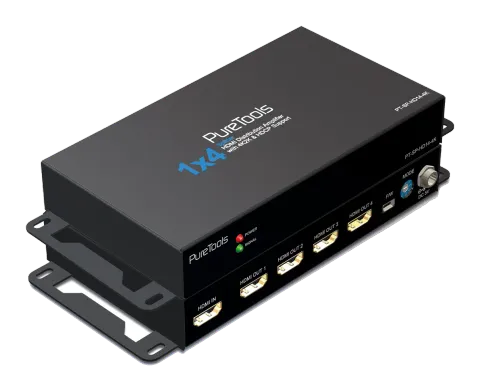
Safety and Notice
Please read all of these instructions carefully before you use the device. Save this manual for future reference.
The PT-SP-HD14-4K 1x4 HDMI Distribution Amplifier with 4K2K & HDCP Support has been tested for conformance to safety regulations and requirements, and has been certified for international use. However, like all electronic equipments, the PT-SP-HD14-4K should be used with care. Please read and follow the safety instructions to protect yourself from possible injury and to minimize the risk of damage to the unit.
- Follow all instructions and warnings marked on this unit.
- Do not attempt to service this unit yourself, except where explained in this manual.
- Provide proper ventilation and air circulation and do not use near water.
- Keep objects that might damage the device and assure that the placement of this unit is on a stable surface.
- Use only the power adapter and power cords and connection cables designed for this unit.
- Do not use liquid or aerosol cleaners to clean this unit. Always unplug the power to the device before cleaning.
Introduction
The PT-SP-HD14-4K 1x4 HDMI Distribution Amplifier with 4K2K & HDCP Support provides the most cost effective and advanced HDMI splitter solution on the market, by which the high definition video and high quality audio can be transmitted to 4 different locations without losing quality. PT-SP-HD14-4K supports all 3D formats and the true 4K2K video!
With built-in Mini-USB firmware update mechanism, the compatibility among countless HDMI sources and receivers can be further guaranteed. With the upmost 36 bit deep color video and high definition audio support, PT-SP-HD14-4K is suitable for high quality HDMI broadcasting, digital signage and education applications!
Features
- Supports HDMI Deep Color & 3D / DVI 1.0 compliant
- HDCP 1.3 compliant
- Wide frequency range: 25MHz~340MHz
- Video bandwidth: 10.2Gbps
- Resolution up to 4K2K @30
- Supports default EDID and has ability to learn the EDID of displays
- Supports xvYCC, x.v.Color & Deep Color
- Mini-USB firmware update for expanding compatibility
- Supports Dolby Digital, DTS-HD and Dolby TrueHD audio
- Easy installation
Package Contents
- 1x PT-SP-HD14-4K
- 1x DC 5V2A wall wart
- 1x User Manual
Specification
| Item | Description |
|---|---|
| Units | Distribution Amplifier [Splitter] |
| HDMI Compliance | HDMI Deep Color, full 3D & 4K2K |
| DVI Compliance | DVI 1.10 |
| HDCP Compliance | HDCP 1.3 |
| Video Bandwidth | Single-link 340MHz [10.2Gbps] |
| Video Support | Up to 4K2K @30 |
| Audio Support | DTS-HD Master Audio, Dolby TrueHD Dolby Digital, DTS, DVD-Audio, LPCM, SACD, MPCM |
| ESD Protection | −Human body model — ±19kV (air-gap discharge) & ±12kV (contact discharge) −Core chipset — ±2kV |
| PCB stack-up | 4-layer board [impedance control — differential 100Ω; single 50Ω] |
| Firmware update | Feasible via Mini-USB port |
| ARC | N/A |
| HDMI 1.4 Ethernet | N/A |
| Input | 1x HDMI [7.1ch audio & video] |
| Output | 4x HDMI [7.1ch audio & video] |
| HDMI Connector | Type A [19-pin female] |
| Rotary control switch | EDID Mode selection |
| Mechanical | |
| Housing | Metal enclosure |
| Dimensions [L x D x H] | Model 154 x 83 x 25mm [6.1" x 3.3" x 1"] Package 264 x 170 x 77mm [10.4" x 6.7" x 3."] Carton 430 x 358 x 291mm [16.9" x 14.1" x 11.5"] |
| Weight | Model 583g [20.5 oz] Package 1126g [2.5 lbs] |
| Fixedness | Wall-mounting case |
| Power supply | 5V 2A DC |
| Power consumption | 10 Watt (max) |
| Operation temperature | 0~40°C [32~104°F] |
| Storage temperature | -20~60°C [-4~140°F] |
| Relative humidity | 20~90% RH (no condensation) |
Connection Diagram
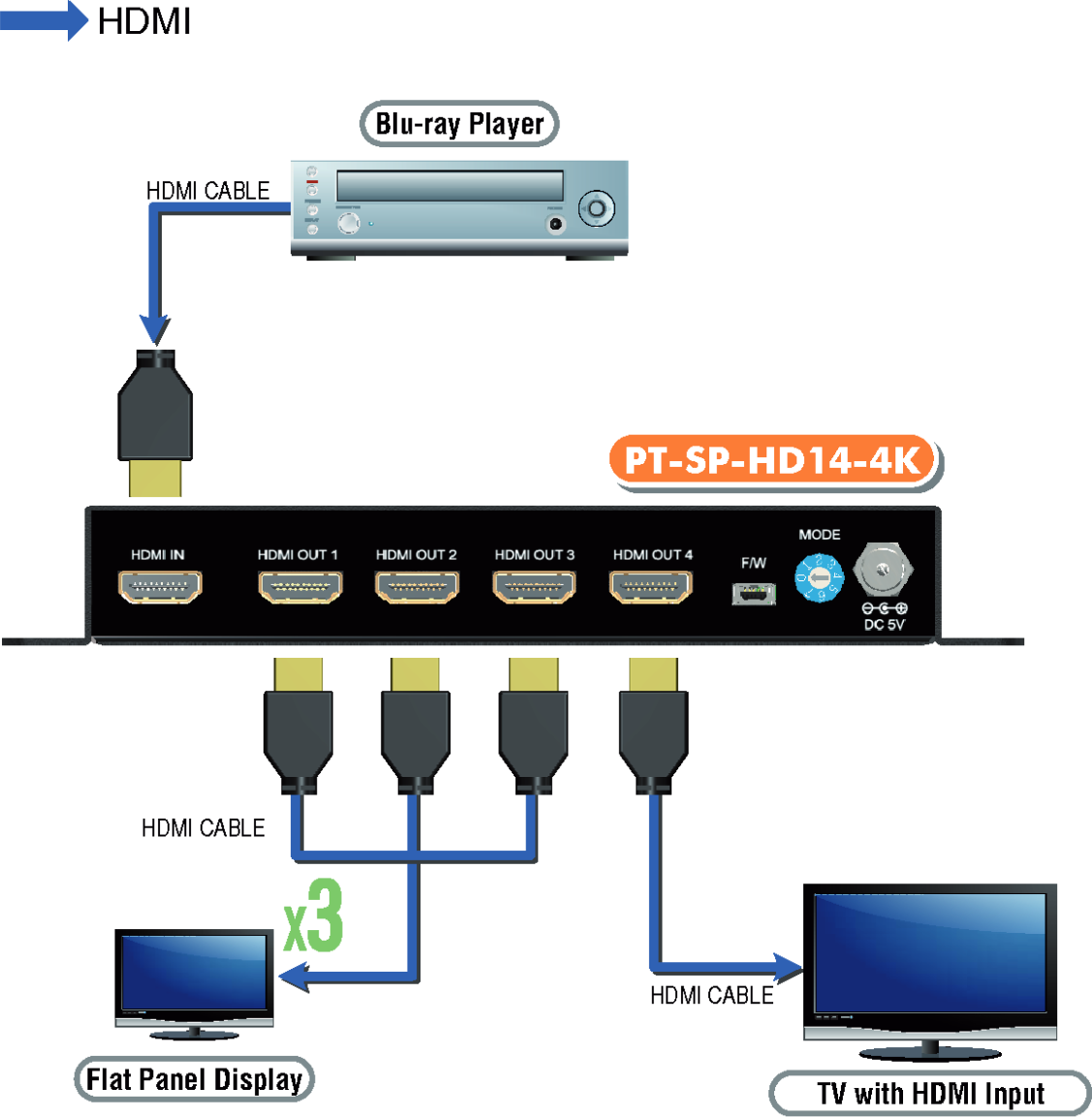
Panel Description
Front Panel
Rear Panel
- Power LED: Lights on when device is ready
- Signal LED:Signal LED indicator

- HDMI IN: Connect to a HDMI input source
- HDMI OUT1-4: HDMI outputs to HDMI displays [HDMI OUT1: EDID Learn Default]
- Mini-USB: For technical support only [firmware update]
- MODE: 0 - F/W update mode 1 - EDID Full-HD(1080p@60) - 24bit 2D video & 7.1ch audio 2 - EDID Full-HD(1080p@60) - 24bit 2D video & 2ch audio 3 - EDID Ultra-HD(4K2K@30) - 24bit 2D video & 7.1ch audio

- 4 - EDID Ultra-HD(4K2K@30) - 24bit 2D video & 2ch audio
- 5 - EDID HD(1080p@30)(1080i@60)(720p@60) - 24bit 2D video & 2ch audio
- 6 - Auto EDID analysis learning mode
- 7 - EDID learning mode [Please use HDMI OUT 1port for learning EDID from display]
- +5V DC: Connect to the +5V DC 2A power supply unit
Automatic EDID learning will detect all the connected HDMI equipped monitors and analyze all the content of EDID. The EDID with minimal resolution support will be the reference EDID for incoming HDMI source players.
Installation
Notice
- Switch off all devices, including monitors.
- Connect to the displays.
- Connect an HDMI source (such as a Blu-ray Disc player) to the HDMI In.
- Plug in 5V DC power supply.
- Power on the HDMI monitors.
- Power on the HDMI source.
- While connecting a new monitor to the splitter under mode6(auto EDID) & mode7(EDID learning), experiencing a short period of time without display might be expected. The splitter will do Automatic EDID learning which analyzes the newly connected monitor to see if the EDID for the HDMI input is necessary to update!.
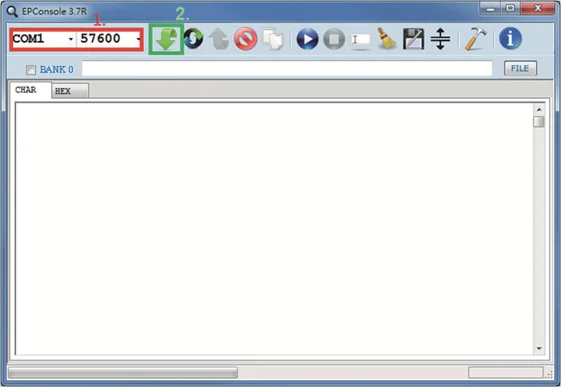
- For firmware update through Mini-USB, users MUST turn the power off, set the dip switch to “ON”, and then connect an Mini-USB cable between PC and device. Open the firmware update software, [1] set the correct com port and baud rate (57600 is recommended), [2] click the “File” button to direct to the firmware HEX or BIN file, power on the device and press “Program MCU” symbol to firmware update. Once update process is done, please power off the device and set the dip switch back to “1”.
Broadcasts HDMI signal to 4 DVI displays!
Notice
Warranty
Limited Warranty
The SELLER warrants the PT-SP-HD14-4K 1x4 HDMI Distribution Amplifier with 4K2K & HDCP Support to be free from defects in the material and workmanship for 1 year from the date of purchase from the SELLER or an authorized dealer. Should this product fail to be in good working order within 1 year warranty period, The SELLER, at its option, repair or replace the unit, provided that the unit has not been subjected to accident, disaster, abuse or any unauthorized modifications including static discharge and power surge. This warranty is offered by the SELLER for its BUYER with direct transaction only. This warranty is void if the warranty seal on the metal housing is broken.
Unit that fails under conditions other than those covered will be repaired at the current price of parts and labor in effect at the time of repair. Such repairs are warranted for 90 days from the day of reshipment to the BUYER. If the unit is delivered by mail, customers agree to insure the unit or assume the risk of loss or damage in transit. Under no circumstances will a unit be accepted without a return authorization number.
The warranty is in lieu of all other warranties expressed or implied, including without limitations, any other implied warranty or fitness or merchantability for any particular purpose, all of which are expressly disclaimed.
Proof of sale may be required in order to claim warranty. Customers outside Taiwan are responsible for shipping charges to and from the SELLER. Cables and power adapters are limited to a 30 day warranty and must be free from any markings, scratches, and neatly coiled.
The content of this manual has been carefully checked and is believed to be accurate. However, The SELLER assumes no responsibility for any inaccuracies that may be contained in this manual. The SELLER will NOT be liable for direct, indirect, incidental, special, or consequential damages resulting from any defect or omission in this manual, even if advised of the possibility of such damages. Also, the technical information contained herein regarding the PT-SP-HD14-4K features and specifications is subject to change without further notice.
Asking for Assistance
Technical Support:
Phone: +49 5971 800299 - 0
Fax: +49 5971 800299 - 99
Technical Support Hours:
8:30 AM to 5:00 PM Monday thru Thursday
8:30 AM to 4:00 PM Friday
Write To:
PureLink GmbH
Von-Liebig-Straße 10
D - 48432 Rheine
www.purelink.de
Legal & Compliance
Product identification
Model: PT-SP-HD14-4K – manual version 1.0
Trademarks and disclaimer
Product model and logo are trademarks. All other company and product names mentioned are trademarks of their respective owners. All rights reserved. No part of this publication may be copied or reproduced without prior written permission. We reserve the right to make changes to the device, packaging or manual and accept no liability for misprints.
Disposal of electrical and electronic equipment
WEEE reg. no.: DE 93847290
The crossed-out wheelie bin symbol on the product, packaging or in this manual means that electrical and electronic equipment must not be disposed of with household waste at the end of its life. Hand in old devices free of charge at a public collection point or return them to a distributor obliged to take them back. Remove batteries and lamps that can be removed without destroying the device before handing it in, and delete any personal data stored on the device. Details are regulated by national law. By returning old devices you help protect the environment.
Packaging
Dispose of packaging separately by material (paper/cardboard, plastics) via the local collection systems. Keep packaging material away from children – risk of suffocation. Packaging register LUCID: DE5958616449295.