
Box. Fe
Help is only an email away: support@hdanywhere.com.4
GlossaryContents
Video enabled MHUB
Specifically a video distribution system manufactured by HDANYWHERE.
Audio enabled MHUB
Specifically an audio distribution system manufactured by HDANYWHERE
Standalone When MZMA is installed by itself.
Stack
When MZMA is installed with one or more stackable MHUB systems.
V&A
A stack comprised of one Video enabled MHUB and multiple MZMA systems.
Master
The designated controller for all other MHUB systems found in a stack.
Slave
MHUB devices which communicate to a Master MHUB device.
uControl
A remote control app for MHUB systems made by HDANYWHERE and available from iOS app stores.
Control System
A 3rd party method of control for MHUB systems.
For example, Crestron, Control4, RTI, Savant, Fibaro etc.
uOS uControl OS is MZMA’s on-board operating system.
In the box
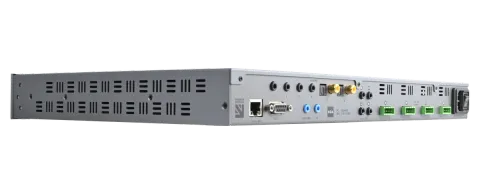
- x1 Multi Zone Matrix Amp (6x4) 55 Chassis/Hub
- x4 Rubber Feet
- x4 Four Pin Phoenix Connector
- x1 Chassis mounting bracket pairs
- x1 100-240V AC 50/60Hz cable (IEC lead)
Name: Multi Zone Matrix Amp (6x4) 55
Product code: MZMA6455
Help is only an email away: support@hdanywhere.com.6
IMPORTANT:
For optimum performance and safety, please read these instructions carefully before connecting, operating or configuring this product. Please keep this manual for future reference.
Caution: Surge protection is recommended
This MHUB system contains sensitive electrical components that may be damaged by electrical spikes, surges, electric shock, lightening strikes, etc. The usage of surge protection systems is recommended in order to protect and extend the life of your system.
This product is protected by International Patents:
GB 2548668
US 10587822
HK 1238827
CN 108259784
AU 201711363118 (PENDING)
Features
- Four unbalanced analogue stereo inputs (3.5mm stereo jack)
- Two digital inputs (Digital Coaxial & Optical)
- 55W per channel at 4Ω (all channels driven @ 42W)
- 30W per channel at 8Ω (all channels driven @ 30W)
- Fully analogue for superior sound quality reproduction
- Adjustable analogue 3-band EQ
- Adjustable input gain from -14dBu to +16dBu in 2dB steps.
- Power-saving amplifier shut-down (manual or automated) and low power modes
- Works with uControl app and remote
- High-efficiency power supply
- 2 Year Warranty (+1 with HDA Cloud Registration)
- Sold as a complete package with mounting kit included.
Specification
| Form factor | 19”/1U rack-mountable |
|---|---|
| Input / Output / Line Out | 6 / 4 / 4 |
| Input(s) | 3.5mm Stereo Jack (x4) |
| Optical / Digital Coaxial (x2) | |
| Output(s) | Amplified output (x4) |
| Input audio format support | Stereo |
| Max input level | +12dBu (+9.8dBv) |
| Input gain (2dB steps) | -14dBu — +16dBu |
| Amplifier output power | 55W per channel at 4Ω |
| 30W per channel at 8Ω | |
| Channel output level (1dB steps) | 0dBu — -66dBu (1dB steps) |
| -100dB mute | |
| Max output level | -72dB — 0dB |
| Max output level (line-out) | +16dBu (+14dBv) |
| EQ (2dB steps) | Treble: +/- 14dB @ 10KHz |
| Mid: +/- 14dB @ 1KHz | |
| Bass: +/- 14dB @ 100Hz | |
| Balance (1dB steps) | +/- 6dB |
| Power consumption (W) | Min / Max 14 / 360 |
| Power (V) | 110-240 |
| Operating temperature (C) | -10 — 60 |
| Storage temperature (C) | -15 — 70 |
| Relative humidity | 5% — 95% non condensing |
| Housing | Steel |
| Colour | Grey (Carbonite) |
| Dimensions (W/D/H) mm | 440 x 284 x 43 |
| Weight (g) | Chassis: 4700 |
| Package: 5750 | |
| Warranty | 2 Year Warranty (+1 with HDA Cloud Registration) |
Rear panel
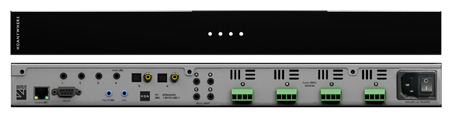
- Audio (IN) 1-4: Connect analogue audio sources via 3.5mm stereo jack cable.
- Audio (IN) 5-6: Connect digital audio sources to the paired optical or digital-coax input ports. These ports are paired meaning that you can not use both the digital-coax and optical port at the same time.
- Audio (OUT) A-D: 110w Stereo Output via 4-way phoenix connectors.
- 3a.Terminate speaker cable to pins (R - /+) then (L - / +) as per the diagram.
- Control (IP): Connect MZMA system to your router via this port to setup and control via IP.
- RS232: Connect MZMA directly to a control system via RS232.
- Hub IR (IN): Send Infrared (IR) commands from a remote control or control system via a HDA IR Receiver in to MZMA for switching control.
- MHUB LINK: For future expansion.
- Mirror OUT A-D: Audio line-out ports. Full range audio mirrors for audio outputs (A-D). Additionally can be used for subwoofers as long as they are able to perform a low-pass filter.
- AC Power: Connect an IEC lead to this port to provide power to your MHUB.
Note on Speaker Wiring:
3a: Terminate speaker cable to pins (R - /+) then (L - / +) as per the diagram.
Front panel
- HDANYWHERE: LED indicator light. If this light is on and solid then MZMA has power and is on.
- System Status: Indicator light which represents MZMA’s error state for both input and output. If no lights are active then MZMA is operating as normal. Each circle represents (from left-to-right) either the analogue input, lit in white colour, 1,2,3,4 or the output A,B,C,D lit in red colour.
- White Circle LED: Input is overloaded (reduce input gain or adjust audio source gain settings)
- Red Circle LED: Output is in overdrive
Help is only an email away: support@hdanywhere.com.12
MZMA control methods
MZMA has been designed to be operated and controlled in numerous ways depending on your requirements. There are no control buttons on the front of the MZMA (see MZMA (6x4) Front Panel). This MHUB has been designed to be located centrally and its control methods are primarily those which do not require line of sight to the unit. The methods to control MZMA and considerations for each are listed below.
- uControl and uControl Remote: Available on iOS, uControl is MZMA’s native method of control. All of MZMA’s built-in features are available; offering comprehensive control over switching, volume, grouping, executing Sequences and mute states in all zones. uControl communicates over the same Local Area Network (LAN) as your MZMA which allows for global control over the entire system regardless of what zone you are in.
- Voice: All MZMA systems support voice control as standard via an Amazon Echo (Alexa) device. Voice control is not designed to act as a primary control method but to assist the other methods listed on this page. Using voice it is possible to control volume adjustments (“set volume to 25%”), muting and switching input from any zone.
- Third-party control system: Control via a third-party control system is also supported using our latest and most advanced API to date. For an up-to-date list of systems that MZMA supports please visit the “Control Drivers” section of our support site: http://support.hdanywhere.com. Control varies depending on the control system being used but typically, switching, volume and mute control is supported.
- uOS: Any device with a web browser can control MZMA directly from the uOS dashboard. From here it is possible to control switching, volume and mute states. uOS is also where all configuration for MZMA can be done.
Stacking: creating (V&A or A&A) systems for use with uControl
MZMA is a ‘stackable’ system meaning that it can be added to any MHUB PRO 2.0, MHUB S (A) or MHUB system. When you create a system comprised of a video MHUB and MZMA then we refer to this as a V&A system. IMPORTANT: this section applies to stack systems that are to be controlled using the uControl app or the uControl remote. If you intend on controlling your MHUB or MHUB + MZMA with a control system you can skip this part.
Note: uControl Zone Processor (ZP) is required for stacking
Stacking works by taking one or more MHUB or MZMA systems and combining them together so that it presents itself to the user as one large system. To build a stacked system you will need a ZP to act as your stack controller. This is referred to as the “Master” device. All communication and the large majority of system configuration will be done on the Master device only.
Note: You can only create a stack with the uControl app
To create a stacked system you will need the uControl app. uControl will scan your network and will identify any HDANYWHERE device that is present on it. If more than one MHUB/MZMA is found then you will be presented with additional options: 1) to setup and connect to any system in standalone mode or 2) to combine one or more MHUB/ MZMA systems in to a stack. If you select option #2, then you will be asked to nominate your Master device first.
- A stack system can only be made with a uControl Zone Processor. This must be detectable in the network scan when devices are being discovered.
- You can reorder the Slaves in your stack to match how your systems are physically setup in your rack.
Tip: Have a plan in place before you start
It is advisable to have a drawing or a plan in place before you start to connect your system. Outputs from MHUB can act as inputs for Slave MZMAs and both can be switched to any input/output combination. This can get very confusing! Detail everything and label your cables and interconnects to make troubleshooting easier.
Help is only an email away: support@hdanywhere.com.16
Standalone operation
Lynx
Audio (IN)
Mirror (OUT) Control (IP) RS232 Hub IR (IN) Link
1 2 3 4 5 6
A B
C D
(- R +) (- L +) (- R +) (- L +) (- R +) (- L +) (- R +) (- L +)
A B C D 2X55W/4Ω
Audio (OUT)
100-240V AC 50/60HZ
PC: MZMA6455
SKU: 1.05.912.002.1
Living Room
AUDIO ZONE WITH SUB
Dining Room Bedroom
SONOS PORT Bluesound NODE
NAD CS1
MZMA (6x4) 55
Ensuite
AUDIO ZONE ADDITIONAL AUDIO OUTPUT AUDIO ZONE
Stacked setup with uControl Zone Processor
Audio (IN) Mirror (OUT)Control (IP) RS232 Hub IR (IN) Link 1 2 3 4 5 6 A B C D (- R +) (- L +) (- R +) (- L +) (- R +) (- L +) (- R +) (- L +) A B C D 2X55W/4Ω Audio (OUT) 100-240V AC 50/60HZ PC: MZMA6455 SKU: 1.05.912.002.1 A B C D A B C D Digital/Stereo (OUT)A B 1 2 3 4 1 2 3 4 CONTROL Hub IR (IN) Display IR (IN) All IR (IN) Source IR (OUT) AVR IR (OUT) A1 A2 A3 A4 RS232 (IN) Source (IN) 100-240V AC 50/60HZ RS232 Audio (IN) Video / Audio (OUT) Living Room VIDEO + AUDIO ZONE Dining Room Bedroom SONOS PORT ROUTER MHUB PRO 2.0 (4x4) 40 MZMA (6x4) 55 uControl Zone Processor (1) CONTROLLER Ensuite AUDIO ZONE AUDIO ZONE VIDEO + AUDIO ZONE
Help is only an email away: support@hdanywhere.com.18
Stacked setup with a control system
Audio (IN) Mirror (OUT) Control (IP) RS232 Hub IR (IN) Link
1 2 3 4 5 6
A B C D
(- R +) (- L +) (- R +) (- L +) (- R +) (- L +) (- R +) (- L +)
A B C D2X55W/4Ω
Audio (OUT)
100-240V AC 50/60HZ
PC: MZMA6455
SKU: 1.05.912.002.1
A B C D
A B C D Digital/Stereo (OUT)A B
1 2 3 4
1 2 3 4
CONTROL
Hub IR (IN) Display IR (IN) All IR (IN) Source IR (OUT) AVR IR (OUT) A1 A2 A3 A4 RS232 (IN)
Source (IN)
100-240V AC 50/60HZ
RS232
Audio (IN)
Video / Audio (OUT)
Living Room
VIDEO + AUDIO ZONE
Dining Room Bedroom
SONOS PORT
ROUTER
MHUB PRO 2.0 (4x4) 40
MZMA (6x4) 55
Control System
CONTROLLER
Ensuite
AUDIO ZONE AUDIO ZONE VIDEO + AUDIO ZONE
Hire a HDA Pro
If cabling infrastructure, control and best practises appear a little too much to absorb and learn then why not hire a HDA Pro to do the work instead for you?
Having your HDANYWHERE system professionally installed should help to guarantee the system’s long-term performance and ensure that it blends neatly with your decor.
All HDA Pros have the added ability to manage your system remotely for you - meaning that routine maintenance and even advanced troubleshooting can be done without the need to visit your home. Ask our HDA Pros for home control, cinema, heating/AC, lighting and security services. Download a guide to picking a HDA Pro here: https://content2.hdanywhere.com/en/downloads/documents/hdanywhere_doc-picking-an-installer.pdf
Find a HDA Pro anywhere in the world today
Visit: https://hdanywhere.com/dealers-and-installers/
Important information
Help is only an email away: support@hdanywhere.com.22
Important information
Terms & Policies, including General Data Protection Regulation (GDPR) and other Data Protection Laws.
During the setup of MHUB, the HDA Pro (Installer) and End-User are required to agree to a set of terms, conditions, rules, policies and license agreements, including the HDANYWHERE Privacy Policy. These terms, notices and policies are, collectively, the “Agreements”. By installing or using MHUB, you agree to be bound by the Agreements.
EU Conformity
Hereby, HDANYWHERE declares that this HDMI connectivity device is in compliance with the essential requirements and other relevant provisions of the following Directives: 2006/95/EC (LVD Directive); 2004/108/EC (EMC Directive); 1999/5/EC (R&TTE Directive). The full text of the EU declaration of conformity is available in the compliance section at HDANYWHERE.com/legals
Recycling your device properly
In some areas, the disposal of certain electronic devices is regulated. Make sure you dispose of or recycle your device in accordance with your local laws and regulations.
HDANYWHERE Limited Product Guarantee
WHO WE ARE
1. We are HD CONNECTIVITY LTD trading as HDANYWHERE (“HDA”), a limited company registered under number 06046737 in England and Wales with its registered offices at The Haysfield, Malvern, WR14 1GF, United Kingdom.
OUR GUARANTEE TO YOU
2. We, HDANYWHERE warrant to you, the end user of the HDA hardware (the “Products”) that on the date of delivery of the Products to you, and from that date to the end of the period specified in your user manual or to the end of the period as extended by paragraph 3 if applicable (the “Guarantee Period”), the Products shall:
- match any description that has been provided to you;
- be free from any significant defects in their design, the materials used to make them, and the way they are made;
- be of satisfactory quality (within the meaning of the Consumer Rights Act 2015); and
- be fit for any purpose held out by us.
We offer this guarantee to all our customers who are resident and have an address in Great Britain and Northern Ireland.
EXTENDING YOUR GUARANTEE
3. On registering your Products with HDA Cloud, the guarantee offered in paragraph 2 by us will automatically extend for a period of one year, provided that your registration takes place within 30 days from the date of delivery. The one year guarantee extension starts automatically from the date that the original guarantee ends.
HOW TO CLAIM ON YOUR GUARANTEE AND YOUR REMEDIES
4. Subject to paragraphs 5 and 6 of this guarantee, Your sole remedies under Our guarantee to You are as follows:
- Up to 30 days: we will repair or replace your Products or provide you with a full refund of the price of the defective Products at your option.
- Up to 6 Months: we will repair or replace your Products. If we are unable to repair or replace your Products we will provide you with a full refund of the price of the defective Products.
- Up to 3 (4) Years: we will repair or replace your Products. If we are unable to repair or replace your Products we will provide you with a partial refund of the price of the defective Products based upon the devaluation of the Products since the time of purchase.
5. In order to claim under the guarantee given to you in paragraph 2 you will need to:
- give us notice in writing of your intention to claim under the guarantee during the Guarantee Period, and do so within a reasonable time after finding that some or all of the Products do not comply with the guarantee set out in paragraph 2;
- show that the Products that you claim are defective, have been examined by a HDA Pro or other authorised or suitably qualified installer, and that they have confirmed in writing that the suspected defect in the Products stems solely from a fault in the HDA hardware;
- give us a reasonable opportunity to examine the Products in question;
- provide us with an order number and a dated sales or delivery receipt from an HDA Distributor, HDA Pro or other authorised dealer, reseller or installer of the Products.
- obtain from us in advance of returning the Products a return merchandise authorisation and/or case number ; and
- (if asked to do so by us) return such Products to our place of business at our cost.
CIRCUMSTANCES WHERE YOUR GUARANTEE DOESN’T APPLY
6. We shall not be liable for the Products’ failure to comply with the guarantee set out in paragraph 2 in any of the following events:
- If you make any further use of the Products after giving us notice of an issue in accordance with paragraph 5;
- the defect arises because you failed to follow our oral or written instructions as to the storage, installation , use and maintenance of the Products;
- the defect arises as a result of your use of the Products with any other software or hardware that is not compatible with the Products;
- the products are used by you for any commercial purpose, including rental or demonstrative purposes;
- you alter or repair the Products without the written consent of HDA;
- the defect arises as a result of an act of god, fair wear and tear, or your misuse, abuse, unreasonable use, wilful damage, negligence, or abnormal storage of the Products or by any other causes unrelated to defective hardware or manufacturing;
- where the serial number has been altered, defaced or removed;
- where the warranty seal on the system has been altered, defaced or removed; or
- where the Products differ from their description as a result of changes made to ensure they comply with applicable statutory or regulatory requirements.
TRANSFERRING YOUR GUARANTEE TO SOMEONE ELSE
7. [HDA will not accept any liability under such guarantee unless you are the original customer or can produce a letter or chain of letters from the original customer and subsequent customers (where appropriate) transferring the benefit of the guarantee to you.]
PRODUCTS THAT ARE NOT COVERED BY THIS GUARANTEE
8. This guarantee does not cover products sold and clearly marked “as is”, “B-grade”, or with faults. This guarantee does not apply to any system software that is preinstalled in the HDA hardware, or is subsequently provided via update or upgrade releases. Any and all HDA software is licensed to you under the terms of a separate end user licence agreement found here: https://hdanywhere.com/legal/eula/
HOW THIS GUARANTEE WORKS WITH OUR EULA
9. We may void this guarantee if we reasonably believe that the HDA system has been used in a manner that violates terms of our separate End User Licence Agreement (EULA) for the HDA software. You assume all-risk and liabilities associated with the use of third party products in conjunction with the Products.
YOUR STATUTORY RIGHTS
10. This guarantees is in addition to your statutory rights (including under the Consumer Rights Act) which are not affected by this guarantee
GENERAL TERMS OF THIS GUARANTEE
- Except as provided in this guarantee, we shall have no liability to you in respect of the Products’ failure to comply with the guarantee set out in paragraph 2.
- We reserve the right to amend or withdraw this guarantee at any time although for the avoidance of doubt any guarantees that are in existence at such a time will be honoured.
- These Conditions shall apply to any repaired or replacement Product supplied by us.
GUARANTEE CONTACT INFORMATION
To contact (support@hdanywhere.com) or call HDANYWHERE Technical Support (call charges will depend on your telephone provider. Please check with your operator for exact charges).
The team is available 9am - 5pm weekdays.
To help us handle your query promptly, please have your invoice number and model SKU and serial ready.
Let us know what you think.
We would love to hear how we could further improve our products and services.
If we can make something better, please let us know!
support@hdanywhere.com
Copyright © HDANYWHERE.
HDANYWHERETM is a trading name of HD Connectivity Ltd.
Registered in England & Wales 06046737 VAT 913222367
Note: HDANYWHERE assumes no responsibility for any inaccuracies that may be contained in this document. In no event will HDANYWHERE be liable for direct, indirect, special, incidental, or consequential damages resulting from any defect or omission in this document, even if advised of the possibility of such damages.
Legal & Compliance
Product identification
Model: HDA-250901 – manual version 1.0
Trademarks and disclaimer
Product model and logo are trademarks. All other company and product names mentioned are trademarks of their respective owners. All rights reserved. No part of this publication may be copied or reproduced without prior written permission. We reserve the right to make changes to the device, packaging or manual and accept no liability for misprints.
Disposal of electrical and electronic equipment
WEEE reg. no.: DE 93847290
The crossed-out wheelie bin symbol on the product, packaging or in this manual means that electrical and electronic equipment must not be disposed of with household waste at the end of its life. Hand in old devices free of charge at a public collection point or return them to a distributor obliged to take them back. Remove batteries and lamps that can be removed without destroying the device before handing it in, and delete any personal data stored on the device. Details are regulated by national law. By returning old devices you help protect the environment.
Packaging
Dispose of packaging separately by material (paper/cardboard, plastics) via the local collection systems. Keep packaging material away from children – risk of suffocation. Packaging register LUCID: DE5958616449295.