
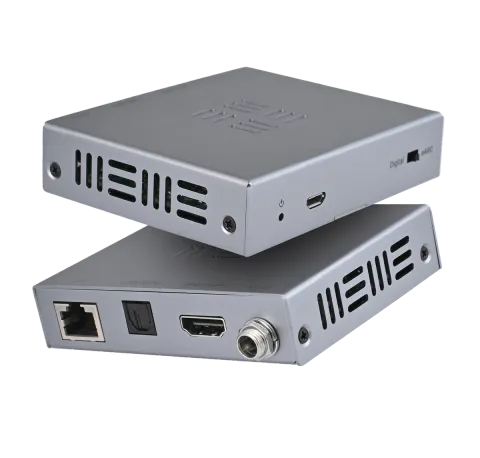
XTND Audio (100) eARC.
XTND Audio (100) eARC Transmitter
- Power: If this LED is on then the XTND unit has power and is functioning.
- Service port: Used for updating XTND unit firmware.
- Audio mode: Use this switch to tell XTND to route audio from the “Digital (IN)” or “eARC (IN)” port on the XTND transmitter.
- Audio inputs: “Digital (IN)” or “eARC (IN)” audio inputs from a display or projector, for example. Using “eARC (IN)” will also carry CEC commands to the supporting HDMI device.
- Audio outputs: “Digital (OUT)” or “eARC (OUT)” audio outputs to route to an AVR or other audio device.
- CAT Connect: CAT 6 cable (minimum) between the XTND transmitter and the XTND receiver to create a connection between the two units. Maximum transmission distance is 100m/328ft.
- DC12V: Connect a power supply to either the XTND transmitter or receiver. This XTND supports bi-directional power.
XTND Audio (100) eARC Receiver
Example wiring diagram.
The XTND Audio (100) eARC is being used to extract multi-channel audio from a TV app (up to Dolby Atmos/using HDMI only) which is then being routed to the XTND Audio (100) eARC Receiver. This audio is being fed via a HDMI cable to the AVR along with any CEC commands from the display remote such as volume control to provide digital audio and control over distance. Pro Tip: This XTND works in reverse. This means that the Transmitter is located at the display location as that is where the audio source is located.
Legal & Compliance
Product identification
Model: HDA-258943 – manual version 1.0
Warranty and liability
The manufacturer grants the full statutory warranty on all new devices. As the manufacturer has no influence on installation, the warranty only applies to the product itself. If you detect a fault or damage, please contact your dealer and provide your sales slip or invoice as proof of purchase.
The manufacturer is not liable for damage to persons or property caused by improper installation, operation or maintenance not described in this manual. Do not alter or modify the product or its accessories. Any use other than described in this manual is not permitted and voids warranty and guarantee.
Trademarks and disclaimer
Product model and logo are trademarks. All other company and product names mentioned are trademarks of their respective owners. All rights reserved. No part of this publication may be copied or reproduced without prior written permission. We reserve the right to make changes to the device, packaging or manual and accept no liability for misprints.
Disposal of electrical and electronic equipment
WEEE reg. no.: DE 93847290
The crossed-out wheelie bin symbol on the product, packaging or in this manual means that electrical and electronic equipment must not be disposed of with household waste at the end of its life. Hand in old devices free of charge at a public collection point or return them to a distributor obliged to take them back. Remove batteries and lamps that can be removed without destroying the device before handing it in, and delete any personal data stored on the device. Details are regulated by national law. By returning old devices you help protect the environment.
Packaging
Dispose of packaging separately by material (paper/cardboard, plastics) via the local collection systems. Keep packaging material away from children – risk of suffocation. Packaging register LUCID: DE5958616449295.