
CAUTION
Requirement for Installation
Component Checklist
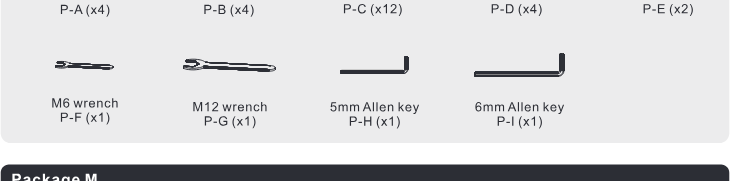
Package P
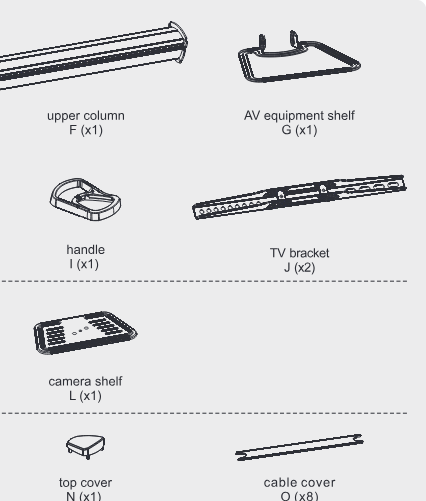
Package M
Read the entire instruction manual before you start installation and assembly. If you have any questions regarding any of the instructions or warnings, please contact your local distributor for assistance.
- Use with products heavier than the rated weights indicated may result in instability causing possible injury.
- Please closely follow the assembly instructions. Improper installation may result in damage or serious personal injury.
- Safety gear and proper tools must be used. This product should only be installed by professionals.
- Make sure that the supporting surface will safely support the combined weight of the equipment and all attached hardware and components.
- Use the mounting screws provided and DO NOT OVER TIGHTEN mounting screws.
- This product contains small items that could be a choking hazard if swallowed. Keep these items away from children.
- This product is intended for indoor use only. Using this product outdoors could lead to product failure and personal injury.
Component Checklist
IMPORTANT: Ensure that you have received all parts according to the component checklist prior to installation. If any parts are missing or faulty, contact your place of purchase for a replacement.
1. Assemble the Base
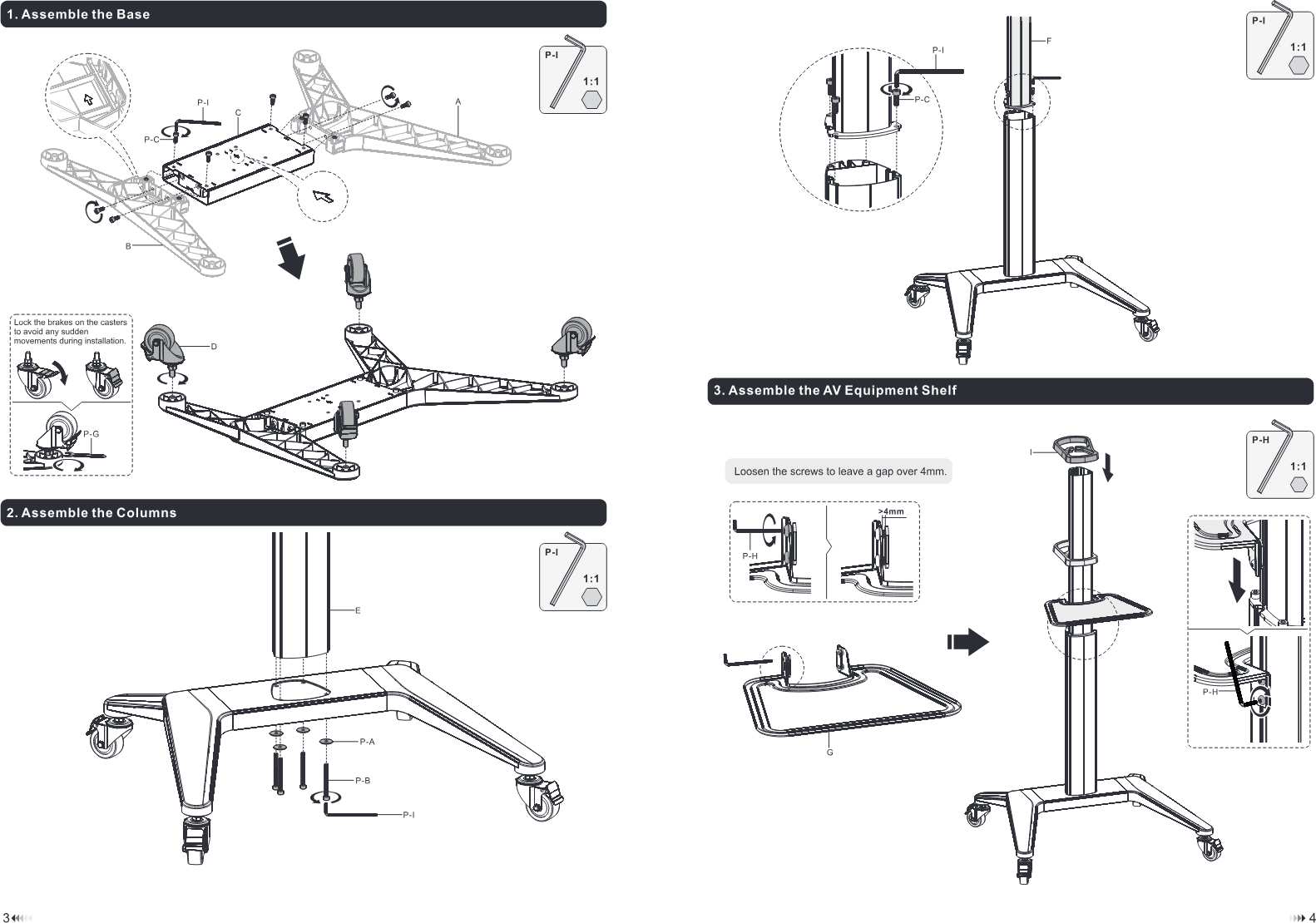
Lock the brakes on the casters to avoid any sudden movements during installation.
2. Assemble the Columns
3. Assemble the AV Equipment Shelf
Loosen the screws to leave a gap over 4mm.
4. Attach the Connector to the Column
Loosen the screws to leave a gap over 4mm.
5. Attach TV Bracket to the Mounting Plate
6a. Attach TV Bracket to Flat Back Screen
| M-A |
|---|
| M-F |
| M-F |
6b. Attach TV Bracket to Irregular Back Screen
✓
✗
| M-C | M-D | 1:1 |
|---|
| M-E | M-F |
|---|
| M-G | M-H |
|---|
7. Hang and Secure the Screen
8. Assemble the Camera Shelf
9. Assemble the Top Cover
10. Cable Management
11. TV Orientation
12. Adjustment
Maintenance
- Check if the bracket is secure and safe to use at regular intervals (at least every three months).
- Please contact your distributor if you have any questions.
Legal & Compliance
Product identification
Models: PDS-0002C, PDS-0003C – manual version 1.0
Warranty and liability
The manufacturer grants the full statutory warranty on all new devices. As the manufacturer has no influence on installation, the warranty only applies to the product itself. If you detect a fault or damage, please contact your dealer and provide your sales slip or invoice as proof of purchase.
The manufacturer is not liable for damage to persons or property caused by improper installation, operation or maintenance not described in this manual. Do not alter or modify the product or its accessories. Any use other than described in this manual is not permitted and voids warranty and guarantee.
Trademarks and disclaimer
Product model and logo are trademarks. All other company and product names mentioned are trademarks of their respective owners. All rights reserved. No part of this publication may be copied or reproduced without prior written permission. We reserve the right to make changes to the device, packaging or manual and accept no liability for misprints.
Packaging
Dispose of packaging separately by material (paper/cardboard, plastics) via the local collection systems. Keep packaging material away from children – risk of suffocation. Packaging register LUCID: DE5958616449295.