
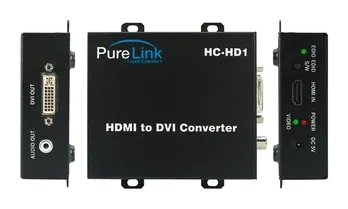
Environmental and Reliability Specifications
Main Features
High Quality Picture-No Signal Loss and Digital Noise Free
Our HC-HD1 is designed to deliver the highest quality picture preserving the native resolutions of the video sources without any signal loss. At the same time, the digital noises that may affect the picture quality will be eliminated. Due to the nature of the digital signals and passing through multiple stack of connection, it is important to eliminate the digital noises and boost the signal strength to preserve/enhance the video signal quality, which HC-HD1does.
Signal Amplification for signal reliability and long length signal transmission
HC-HD1 uses internal or external DC 5V power to run an internal chipset, which was designed to transmit high quality visual signal to long distance.
Compact and Practical Design
z The HC-HD1 is designed compactly and practically allowing customers more ease and convenience
Full HD without changing display
z With previously used DVI display user can enjoy full HD from new source device without quality degradation
HDCP (High-bandwidth Digital Content Protection)
z HC-HD1 fully supports HDCP
z Currently every digital visual product sends high resolution signal with HDCP signal. You cannot see the picture if the product is not compliant to HDCP.
Compliance to HDMI Ver 1.3a
z HC-HD1 fully supports the latest HDMI Ver 1.3a with deep color 36bit
Video Connection
- Ensure the digital video source and display is turned off
- Connect the HDMI, DVI, and audio cable
- Connect power adapter jack
- Turn on the display
- Turn on the source
EDID data saving
EDID Default is set as 1080P. If you want to change the EDID data, please follow these steps.
- Connect DVI output port to display
- Turn on the display and push EDID S/W for 2~3 seconds
- EDID LED is illuminated for about 2 second if EDID was saved correctly
- If EDID was not saved correctly, EDID LED blinks 5~6 times. Please try again after checking the connection of cables and the power of display
- EDID saving is to display the best resolution between the video source and the display
- If you use AV Receiver should EDID save from AV Receiver
- If your AV Receiver does not have HDMI port, you should save EDID from display it supports multi-channel audio.
Video Connection
- Step 1: Ensure the digital video source and display is turned off
- Step 2: Connect the HDMI, DVI, and audio cable
- Step 3: Connect power adapter jack
- Step 5: Turn on the display
- Step 6: Turn on the source
EDID data saving
EDID Default is set as 1080P. If you want to change the EDID data, please follow these steps.
- Step 1: Connect DVI output port to display
- Step 2: Turn on the display and push EDID S/W for 2~3 seconds
- Step 3: EDID LED is illuminated for about 2 second if EDID was saved correctly
- If EDID was not saved correctly, EDID LED blinks 5~6 times. Please try again after checking the connection of cables and the power of display
- EDID saving is to display the best resolution between the video source and the display
- If you use AV Receiver should EDID save from AV Receiver
- If your AV Receiver does not have HDMI port, you should save EDID from display it supports multi-channel audio.
Mechanical Specification
Dimension: 90x103x30 mm
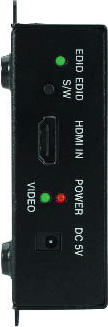
Front part
- DC 5V: DC 5V power input port
- POWER LED: display the status of power
- VIDEO LED: display the status of signal input
- HDMI In: HDMI Input port
- EDID S/W: EDID operation switch
- EDID LED: display the status of EDID operation
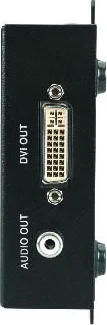
Rear part
- DVI OUT: DVI output port
- AUDIO OUT: digital audio (SPDIF) output port
Technical Specification
| Parameter | Value |
|---|---|
| Data transmission speed | 2.25 Gbps (Single Link) |
| Digital Video Bandwidth | 25~165 MHz |
| Resolution | Up to WUXGA (1920*1200) 480P~1080i/P |
| Input/output signal standard | Digital RGB, TMDS |
| Input connector type | HDMI Female 19P |
| Output connector type | DVI-D Female 29P / RCA JACK |
| Power consumption | 5 Watts Max. |
| Power supply | DC 5V, 2A |
Warranty Information
2 (Two) Years Warranty
Dtrovision LLC warrants this HDMI to DVI Converter to be free from defects in workmanship and materials, under normal use and service, for a period of two (2) years from the date of purchase from Dtrovision LLC or its authorized resellers.
If a product does not work as warranted during the applicable warranty period, Dtrovision LLC shall, at its option and expense, repair the defective product or part, deliver to customer an equivalent product or part to replace the defective item, or refund to customer the purchase price paid for the defective product.
All products that are replaced will become the property of Dtrovision LLC.
Replacement products may be new or reconditioned.
Any replaced or repaired product or part has a ninety (90) day warranty or the reminder of the initial warranty period, whichever is longer.
Dtrovision LLC. shall not be responsible for any software, firmware, information, or memory data of customer contained in, stored on, or integrated with any products returned to Dtrovision LLC for repair under warranty or not.
Warranty Limitation and Exclusion
Dtrovision LLC shall have no further obligation under the foregoing limited warranty if the product has been damaged due to abuse, misuse, neglect, accident, unusual physical or electrical stress, unauthorized modifications, tampering, alterations, or service other than by Dtrovision LLC or its authorized agents, causes other than from ordinary use or failure to properly use the product in the application for which said product is intended.
Legal & Compliance
Product identification
Model: PRO-HC-HD1 – manual version 1.0
Trademarks and disclaimer
Product model and logo are trademarks. All other company and product names mentioned are trademarks of their respective owners. All rights reserved. No part of this publication may be copied or reproduced without prior written permission. We reserve the right to make changes to the device, packaging or manual and accept no liability for misprints.
Disposal of electrical and electronic equipment
WEEE reg. no.: DE 93847290
The crossed-out wheelie bin symbol on the product, packaging or in this manual means that electrical and electronic equipment must not be disposed of with household waste at the end of its life. Hand in old devices free of charge at a public collection point or return them to a distributor obliged to take them back. Remove batteries and lamps that can be removed without destroying the device before handing it in, and delete any personal data stored on the device. Details are regulated by national law. By returning old devices you help protect the environment.
Packaging
Dispose of packaging separately by material (paper/cardboard, plastics) via the local collection systems. Keep packaging material away from children – risk of suffocation. Packaging register LUCID: DE5958616449295.