
Discontinued
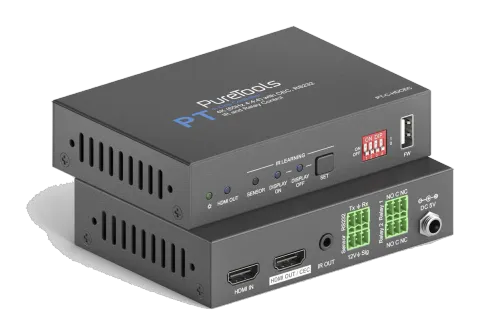
PT-C-HDCEC
4K 18Gbps HDMI CEC and Relay Controller
The PT-C-HDCEC is an 18G in-line HDMI controller designed for system control and HDMI signal extension, supporting IR, RS-232, CEC, and relay integration for automation via sensor input or HDMI signal events. It …
ManualControl (TCP/IP)FAQFirmwareCE declaration ↗Available control interfaces. Expand an active type to see the full command table.
No matching commands.
RS-232 Commands45 commandsActive
Source: manual, chapter System Control Setting, page 18
| Command | Description | Example | Response | |
|---|---|---|---|---|
| SYSONMETH[X]. | Set the trigger method to perform SYSTEM ON. | SYSONMETH1. | SET DETECT VEDIO TRIGGER! | |
| SYSOFFMETH[X]. | Set the trigger method to perform SYSTEM OFF. | SYSOFFMETH1. | SET NOT DETECT VEDIO TRIGGER! | |
| NOSIGDLY:[XXXXX]. | Set the system off time to xxxxx (default 10mins, range of 5mins to 180mins). When no HDMI video signal has been detected, the system will switch off, according to the set time. | SET DETECT NOSIGNAL DELAY TIME [XXX]S | ||
| NOIRDLY:[XXXXX]. | Set the system off time to xxxxx (default 10mins, range of 5mins to 180mins). When no IR signal has been detected, the system will switch off, according to the set time. | SET DETECT NO IR DELAY TIME [XXX]S | ||
| 5VORTMDS[X]. | Set the HDMI video signal trigger condition. | 5VORTMDS0. | DETECT INPUT SOURCE USE 5V! | |
| GSYSONMETH. | Report the trigger method of SYSTEM ON. | SELECT DETECT VEDIO TRIGGER! | ||
| GSYSOFFMETH. | Report the trigger method of SYSTEM OFF. | SELECT NO DETECT VEDIO TRIGGER! | ||
| GNOSIGDLY. | Report the delay time of SYSTEM OFF when the controller detects no input source signal (5V/TMDS). | SET DETECT NOSIGNAL DELAY TIME 300S | ||
| GNOIRDLY. | Report the delay time of SYSTEM OFF when the controller detects no IR sensor signal. | SET DETECT NO IR DELAY TIME 300S | ||
| G5VORTMDS. | Report the detection method of input source. 5V/TMDS | SELECT DETECT INPUT SOURCE USE 5V! | ||
| CECON. | Enable CEC. | Open CEC Function! | ||
| CECOFF. | Disable CEC. | Close CEC Function! | ||
| GCECSTAUS. | Report CEC status. | CEC FUNCTION IS OPEN! | ||
| TVON. | Turn on display (e.g. TV) | |||
| TVOFF. | Turn off display (e.g. TV) | |||
| RS232ON/+[X]:XXX | When detecting a triggering signal, automatically send ASCII command XXX to the third-party device (e.g. Projector) whose baud rate is X. | RS232ON/+3:123abc Send the ASCII command “123abc” to the third-party whose baud rate is 9600. | ||
| RS232ON/-[X]:XXX | When detecting a triggering signal, automatically send HEX command XXX to the third-party device (e.g. Projector) whose baud rate is X. | RS232ON/-3:30 31 32 Send the HEX command “30 31 32” to the third-party whose baud rate is 9600. | ||
| RS232OFF/+[X]:XXX | When not detecting any triggering signal, automatically send ASCII command XXX to the third-party device (e.g. Projector) whose baud rate is X. | RS232OFF/+3:123abc Send the ASCII command “123abc” to the third-party whose baud rate is 9600. | ||
| RS232OFF/-[X]:XXX | When not detecting any triggering signal, automatically send HEX command XXX to the third-party device (e.g. Projector) whose baud rate is X. | RS232OFF/-3:30 31 32 Send the HEX command “30 31 32” to the third-party whose baud rate is 9600. | ||
| RS232U/+[X]:XXX | Set the user-defined ASCII command to send to the third-party device (e.g. projector) whose baud rate is X. | RS232USER/+3:123abc Send the user-defined command “123abc” to the third-party whose baud rate is 9600. | ||
| RS232U/-[X]:XXX | Set the user-defined HEX command to send to the third-party device (e.g. projector) whose baud rate is X. | RS232USER/-3:30 31 32 Send the user-defined command “30 31 32” to the third-party whose baud rate is 9600. | ||
| RS232DLY:[XXX]. | Set the sending interval time between RS232 ON and RS232 USER to XXX (default 3s, range of 1S to 180s). | SET RS232 ON DELAY TIME [XXX]S | ||
| RS232PCS[X]. | Set the sending number of RS232 OFF to X. | SET SEND RS232 OFF ONE TIME! | ||
| RS232OFFDLY:[XX]. | Set the two times sending interval time of RS232 OFF to XX (default 2s, range of 1S to 10s). | SET RS232 OFF SEND DELAY TIME [XXX]S | ||
| GRS232DLY. | Report the sending interval time between RS232 ON and RS232 USER. | SET RS232 ON DELAY TIME 3S | ||
| GRS232PCS. | Report the sending number of RS232 OFF | SELECT SEND RS232 OFF ONE TIME! | ||
| GRS232OFFINT. | Report the two times sending interval time of RS232 OFF. | SET RS232 OFF SEND DELAY TIME 2S | ||
| IRSTUDY[X]. | Learns the IR command from IR remote. | IRSTUDY0. READY STUDY IR DISPLAY OFF,PLEASE REMOTE CONTROL RECEIVER IN 10S! | ||
| IRSEND[X]. | Send the learned IR command. | IRSEND0. | SEND IR DISPLAY OFF! | |
| IRDLY:[XXX]. | Set the sending interval time between IR ON and IR USER to XXX (default 3s, range of 1S to 180s). | SET IR ON DELAY TIME [XXX]S | ||
| IRPCS[X]. | Set the sending number of IR OFF to X. | SET SEND IR OFF ONE TIME! | ||
| IROFFDLY:[XX]. | Set the two times sending interval time of IR OFF to XX (default 2s, range of 1S to 10s). | SET IR OFF SEND DELAY TIME [XXX]S | ||
| GIRDLY. | Report the sending interval time between IR ON and IR USER. | SET IR ON DELAY TIME 3S | ||
| GIRPCS. | Report the sending number of IR OFF. | SELECT SEND IR OFF ONE TIME! | ||
| GIROFFINT. | Report the two times sending interval time of IR OFF. | SET IR OFF SEND DELAY TIME 2S | ||
| RELAY1DLY:[XXX]. | Set the Relay 1 delay time to XXX (default 10s, range of 3S to 180s). | SET RELAY 1 TIME DELAY TIME [XXX]S | ||
| RELAY2DLY:[XXX]. | Set the Relay 2 delay time to XXX (default 10s, range of 3S to 180s). | SET RELAY 2 TIME DELAY TIME [XXX]S | ||
| GRELAY1COT. | Report Relay 1 delay time. | SET RELAY 1 TIME DELAY TIME 10S | ||
| GRELAY2COT. | Report Relay 2 delay time. | SET RELAY 2 TIME DELAY TIME 10S | ||
| RST. | Factory reset. | Factory Default! | ||
| DOWNSCALER[X]. | Enable or disable 4K to1080p down-scaling function. | DOWNSCALER0. Close Down Scaler Function! | ||
| GDOWNSCALER. | Report down-scaling status. | DOWN SCALER FUNCTION IS OPEN! | ||
| GALLINFO. | Report all device information. | |||
| GEDIDMODE. | Report EDID. | EDID:PASS THROUGH | ||
| GHDCPMODE. | Report HDCP mode. |