
Discontinued
PT-FMX-16
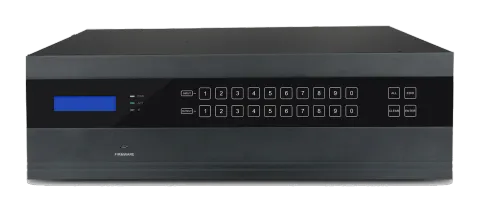
PureTools - Flexible Matrix 16-port chassis, 4K seamless, I/O auto detect
PureTools - Flexible Matrix 16-port chassis, 4K, I/O auto detect.
ManualControl (TCP/IP)FAQCEAvailable control interfaces. Expand an active type to see the full command table.
No matching commands.
RS23270 commandsActive
Source: manual, chapter RS232 Control, page 25
| Command | Description | Response | |
|---|---|---|---|
| /*Type; | Inquire the model | XXXXX | |
| /%Lock; | Lock the front panel buttons | System Locked! | |
| /%Unlock; | Unlock the front panel buttons | System Unlock! | |
| /^Version; | Inquire the firmware version | VX.X.X | |
| /:MessageOff; | Turn off the feedback from the com port. It only shows “switcher OK”. | /:MessageOff; | |
| /:MessageOn; | Turn on the feedback from the com port. | /:MessageOn; | |
| Undo. | Cancel the previous operation. | Undo Ok! | |
| Demo. | Switch to the “demo” mode, 02->01, 2->2, 3->3 … and so on. | Demo Mode AV: 02-> 01 …… | |
| [x]All. | Transfer signal from Input [x] to all outputs | 02 To All. | |
| All@. | Switch on all the outputs | All Open. | |
| All$. | Switch off all the outputs | All Closed. | |
| [x]@. | Switch on output [x] | 02 Open. | |
| [x]$. | Switch off output [x] | 01 Closed. | |
| [x1]V[x2],[x3],[x4]… | Transfer signal from input [x1] to output [x2],[x3],[x4].., separate output channels with “,” | AV: 01->07 AV: 01->08 … | |
| Save[Y]. | Save the present operation to the preset command [Y], [Y]=0~9 | Save To F1 | |
| Recall[Y]. | Recall the preset command [Y] | Recall From F1 AV: 02->04 AV: 02->06 … | |
| Clear[Y]. | Clear the preset command [Y] | Clear F1 | |
| EDIDMInit. | Reset factory default EDID | EDIDMInit. | |
| EDIDM[X]B[Y]. | Manage EDID, enable input [Y] learn EDID data from output [X] | EDIDM07B03 | |
| PWON. | Work normally | PWON | |
| PWOFF. | Enter standby mode | PWOFF | |
| STANDBY. | Enter standby mode, can be awaken via front panel button operations | STANDBY | |
| /+[Y]/[X]:******. | Set communication between PC and HDBaseT receiver. ① Y is for RS232 port (connect with RS232 port of HDBaseT receiver) a. Y = 1 ~ 16, send this command to the corresponding HDBaseT receiver to control far-end device when the Matrix Switcher is working properly. b. Y = A ~ P, send this command to the corresponding HDBaseT receiver when the Matrix Switcher is PWON. c. Y = a ~ p, send this command to the corresponding HDBaseT receiver when the Matrix Switcher is PWOFF. ② X is for baud rate, its value ranges from 1 to 7 (1=2400;2=4800;3=9600;4=19200;5=38400;6=57600;7=115200 ③ ***** is for data (max 48 Byte). | 601% Volume of MIC : 60 (****** and feedback from HDBT receiver) | |
| CustomerSerial:11 111111111111111 11. | Set the customer serial number | customer serial is 1111111111111111111 | |
| HDCPON. | Open HDCP for all output cards. | HDCP ON | |
| HDCPOFF. | Close HDCP for all output cards. | HDCP OFF | |
| %0911. | Reset factory default | Factory Default | |
| Status[x]. | Inquire the respective input for output [x] | AV:01-> 02 | |
| Status. | Inquire respective inputs for all outputs | AV:01->02 AV:03->06 … … | |
| CheckInKatype. | Get the input signal card type *-- no available input signal card/output card, 1--VGA, 2--DVI, 4--BT, 5--SDI, 6--HDMI | Channel IN:*11*4**11*4*. | |
| CheckOutKatype. | Get the output signal card type *-- no available output signal card/input card, 1--VGA, 2--DVI, 4--BT, 6--HDMI | Channel OUT: ***4*62**1**. | |
| %9961. | Get current keylock status | System Unlock!/ System Locked! | |
| %9962. | Inquire current working status | PWON/STANDBY /PWOFF | |
| %9963. | Return all input& output connection status | Port 01 02 03 04 Mode In In In In Port 05 06 07 08 Mode In Ou In In Port 09 10 11 12 Mode Ou Ou In Ou Port 13 14 15 16 Mode Ou Ou Ou Ou | |
| %9964. | Inquire the IP | IP: 192.168.0.178 | |
| %9973. | Return resolutions of all outputs | Resolution Out02 1920x1080P 60 Resolution Out04 1920x1080P 60 … … | |
| %9974. | Get current HDCP Status of output port. “X” means input port or no signal cards. “Y” means the output signal traffic with HDCP; “N” means not. | Out 01 02 03 04 HDCP X X X X Out 05 06 07 08 HDCP X N X X Out 09 10 11 12 HDCP N N X N Out 13 14 15 16 HDCP N N N N | |
| USER/I/[x]:0706%; | Command for I-UH signal card | ||
| USER/I/[x]:0707%; | Command for I-UH signal card | ||
| USER/I/[x]:0408%; | Command for I-UH and I-BT signal cards | ||
| USER/O/[x]:0804%; | Command for O-UH and O-BT signal cards | ||
| USER/O/[x]:0813%; | Command for O-UH and O-BT signal cards | ||
| USER/O/[x]:0824%; | Command for O-UH and O-BT signal cards | ||
| USER/O/[x]:0840%; | Command for O-UH and O-BT signal cards | ||
| USER/O/[x]:0841%; | Command for O-UH and O-BT signal cards | ||
| USER/I/[x]:0409%; | Command for I-BT and O-BT signal cards | ||
| USER/I/[x]:0410%; | Command for I-BT and O-BT signal cards | ||
| USER/O/[x]:0408%; | Command for O-UH and O-BT signal cards | ||
| USER/O/[x]:0409%; | Command for O-BT signal cards | ||
| USER/O/[x]:0410%; | Command for O-BT signal cards | ||
| PortXX/InputMic. | Setup command for audio cards | ||
| PortXX/InputLine. | Setup command for audio cards | ||
| PortXX/SetMicVol:X X. | Setup command for audio cards | ||
| PortXX/SetSourceVol:XX. | Setup command for audio cards | ||
| PortXX/MicVolume+. | Setup command for audio cards | ||
| PortXX/MicVolume-. | Setup command for audio cards | ||
| PortXX/SourceVolume+. | Setup command for audio cards | ||
| PortXX/SourceVolume-. | Setup command for audio cards | ||
| PortXX/SetStereo. | Setup command for audio cards | ||
| PortXX/SetMono. | Setup command for audio cards | ||
| PortXX/MicMute. | Setup command for audio cards | ||
| PortXX/MicUnmute. | Setup command for audio cards | ||
| PortXX/SourceMute. | Setup command for audio cards | ||
| PortXX/SourceUnmute. | Setup command for audio cards | ||
| %9921. | Inquire audio card status | ||
| %9922. | Inquire audio card status | ||
| %9923. | Inquire audio card status | ||
| %9925. | Inquire audio card status | ||
| %9926. | Inquire audio card status | ||
| %9928. | Inquire audio card status |