
Active
PT-HDBT-220WP
4K 18Gbps Multiformat HDBaseT Wallplate Extender Set
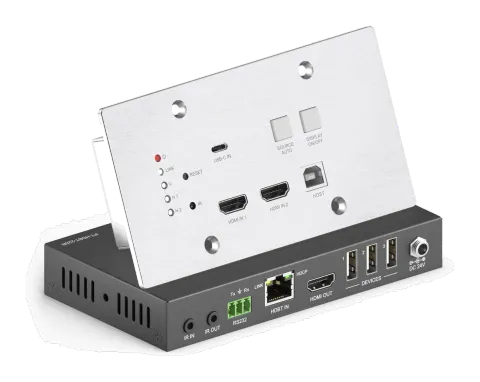
The PT-HDBT-220WP is an HDBaseT wallplate extender set featuring a 3x1 wallplate transmitter switcher and receiver for extension and switching of HDMI or USB-C signals. It transmits uncompressed 4K video, USB data, and …
ManualControl (TCP/IP)FAQSpecificationsDatasheetFirmwareCEAvailable control interfaces. Expand an active type to see the full command table.
No matching commands.
RS-232 Commands28 commandsActive
Source: manual, chapter RS232 Control, page 16
| Command | Description | Example | Response | |
|---|---|---|---|---|
| >GetFirewareVersion | Get firmware version. | <V1.0.0 | ||
| >SetFactoryReset | Restore factory default. | <FactoryReset_True | ||
| >SetReboot | System reboot. | <Reboot_EN | ||
| >SetHelp PARAM | Get the command function and usage. | >SetHelp SetAV | ||
| >SetAV Param | Switch an input AV signal to outputs. Param = H1, H2, C H1 - HDMI1 H2 - HDMI2 C - USB-C | >SetAV H1 >SetAV C | <AV H1 <AV C | |
| >SetRS232Baudrate PARAM | Set the RS232 baud rate. PARAM = 1 ~ 5 1 - 115200 2 - 57600 3 - 38400 4 - 19200 5 - 9600 | >SetRS232Baudrate 1 | <RS232Baudrate 115200 | |
| >GetRS232Baudrate | Get the RS232 baud rate. | <RS232Baudrate 115200 | ||
| >GetAV | Get the current input source. | <AV H1 <AV H2 <AV C | ||
| >SetAutoSwitch PARAM | Enable/disable auto switching mode. PARAM = EN, Dis EN - Enable (Default) Dis - Disable | >SetAutoSwitch EN >SetAutoSwitch Dis | <AutoSwitch True <AutoSwitch False | |
| >GetAutoSwitch | Get the source switching mode. | <AutoSwitch True | ||
| >SetAutoCec PARAM | Enable/disable the function of automatically sending CEC commands. When detecting video input signal or not detecting any video signal, the switcher will automatically send the corresponding CEC command to control the display device. PARAM = EN, Dis EN - Enable (Default) Dis - Disable | >SetAutoCec EN | <AutoCec True | |
| >GetAutoCec | Get the function setting status of automatically sending CEC commands. | <AutoCec True | ||
| >SetAutoCommand PARAM | Enable/disable the function of automatically sending RS232 commands. When detecting video input signal or not detecting any video signal, the switcher will automatically send the corresponding RS232 command to control the display device. PARAM = EN, Dis EN - Enable (Default) Dis - Disable | >SetAutoCommand EN | <AutoCommand True | |
| >GetAutoCommand | Get the function setting status of automatically sending RS232 commands. | <AutoCommand True | ||
| >SetAutoIR PARAM | Enable/disable the function of automatically sending IR signal. When detecting video input signal or not detecting any video signal, the switcher will automatically send the corresponding IR signal to control the display device. PARAM = EN, Dis EN - Enable (Default) Dis - Disable | >SetAutoIR EN | <AutoIR True | |
| >GetAutoIR | Get the function setting status of automatically sending IR signal. | <AutoIR True | ||
| >SetDisplayOn PARAM | Power on/off display device. (Simultaneously send CEC and RS232 commands). PARAM = EN, Dis EN - ON Dis - OFF | >SetDisplayOn EN >SetDisplayOn Dis | <DisplayOn True <DisplayOn False | |
| >SetOffMsgLoopCnt PARAM | Set the number of times to send the DISPLAY OFF RS232 command. PARAM=1 ~ 2 | >SetOffMsgLoopCnt 1 | <OffMsgLoopCnt 1 | |
| >GetOffMsgLoopCnt | Set the number of times to send the DISPLAY OFF RS232 command. | <OffMsgLoopCnt 1 | ||
| >SetOffMsgLoopDelayTime PARAM | Set the sending interval between two Display OFF RS232 commands. PARAM=5 ~ 100 (1=100ms) | >SetOffMsgLoopDelayTime 5 | <OffMsgLoopDelayTime 5 | |
| >GetOffMsgLoopDelayTime | Get the sending interval between two Display OFF RS232 commands. | <OffMsgLoopDelayTime 5 | ||
| >SetPanelCEC PARAM | Set the delay time of sending DISPLAY OFF CEC command. When no signal input, the display device will be automatically turned off when the delay time is up. PARAM = 0 ~ 1800 (second) | >SetPanelCEC 600 | <PanelCEC 600 | |
| >GetPanelCEC | Get the delay time of sending CEC command of turning off display device. | <PanelCEC 600 | ||
| >SetInPortEdid PARAM | Set EDID. PARAM = 0 ~ 9 0 - Bypass 1 - 1920x1080@60 8bit Stereo 2 - 1920x1080@60 8bit High Definition Audio 3 - 3840x2160@30Hz 8bit Stereo Audio 4 - 3840x2160@30Hz Deep Color High Definition Audio 5 - 3840x2160@60Hz Deep Color Stereo Audio 6 - 3840x2160@60 Deep Color High Definition Audio 7 - 3840x2160@60 Deep Color HDR Stereo 8 - 3840x2160@60 Deep Color HDR High Definition Audio 9 - USER EDID | >SetInPortEdid 0 | <InPortEdid 0 | |
| #GET_EDID_MODE | Get the current EDID. | <InPortEdid 0 | ||
| >SetUpdateEdid | Upload the user-defined EDID. | <User edid ready,Please send edid data in 10s. <SetUpdateEdid_True/False <Time out to send edid | ||
| >SetHdcpHdmiOutput PARAM | Set the HDCP mode of HDMI output. PARAM = 1 ~ 2 1 - Active (Default) 2 - HDCP 1.4 | >SetHdcpHdmiOutput 1 | <HdcpHdmiOutput 1 | |
| >GetHdcpHdmiOutput | Get the HDCP mode of HDMI output. | <HdcpHdmiOutput 1 |
RS-232 Commands7 commandsActive
ConnectionBaud rate of the third-party device: 1=115200, 2=57600, 3=38400, 4=19200, 5=9600, 6=4800, 7=2400↓ CSV
Source: manual, chapter Button User-defined, page 22
| Command | Description | Example | Response | |
|---|---|---|---|---|
| >SetPowerOnSendChar_PARAM:XXXX | Set the ASCII RS232 command "XXXX" to be sent to the third-party device (e.g. projector) when the DISPLAY ON button has been pressed. PARAM = 1~7. Baud rate of the third-party device. | >SetPowerOnSendChar_5:1234567 | >SetPowerOnSendChar_5:1234567 Display on to send:1234567 | |
| >SetKeyboardLock Dis | Unlock panel button | <KeyboardLock False | ||
| >SetKeyboardLock EN | Lock panel button | <KeyboardLock True | ||
| >GetKeyboardLock | Get current lock status | <KeyboardLock True <KeyboardLock False | ||
| >SetPowerOnSendHex_PARAM:XX XX | Set the HEX RS232 command "XX XX" to be sent to the third-party device (e.g. projector) when the DISPLAY ON button has been pressed. PARAM = 1~7. Baud rate of the third-party device. | >SetPowerOnSendHex_5:30 31 32 33 | >SetPowerOnSendHex_5:30 31 32 33 Display on to send HEX:30 31 32 33 | |
| >SetSleepSendChar_PARAM:XXXX | Set the ASCII RS232 command "XXXX" to be sent to the third-party device (e.g. projector) when the DISPLAY OFF button has been pressed. PARAM = 1~7. Baud rate of the third-party device. | >SetSleepSendChar_05:ABCDEFG | >SetSleepSendChar_05:ABCDEFG Display off to send:ABCDEFG | |
| >SetSleepSendHex_PARAM:XX XX | Set the HEX RS232 command "XXXX" to be sent to the third-party device (e.g. projector) when the DISPLAY OFF button has been pressed. PARAM = 1~7. Baud rate of the third-party device. | >SetPowerOnSendHex_05:41 42 43 44 | >SetPowerOnSendHex_05:41 42 43 44 Display off to send HEX:41 42 43 44 |