
DiscontinuedPossible alternative: PT-MA-HD44MV
PT-MA-HD44-QV
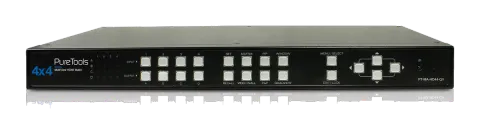
PureTools - HDMI Matrix 4x4 with Quadview, VideoWall, Seamless Switching
The PureTools - HDMI Matrix 4x4 incl. Quadview, VideoWall, Seamless Switching supports Quadview, VideoWall, and seamless switching features.
ManualControl (TCP/IP)FAQSpecificationsAlternative availableCEAvailable control interfaces. Expand an active type to see the full command table.
No matching commands.
RS-232 Commands33 commandsActive
Source: manual, chapter RS232 CONTROL, page 11
| Command | Description | Response | |
|---|---|---|---|
| sw [n] | Switch active port | n: source 1~4 | ||
| mode [n] | Switch video display mode | n: (1) Matrix (2) PIP (3) Windows (4) Video wall (5) PAP (6) Quad | ||
| as [n] | Change video aspect ratio | n: (1) Full Screen (2) Keep Ratio | ||
| output [id] [n] | Set outpurt resolution | id: display A~D n: (1) Auto (2) 1920x1080 (3) 1280x720 | ||
| pip [n] | Switch to PIP mode | n: source 1~4 | ||
| mx [id] [n] | Switch to Matrix mode | id: display A~D n: source 1~4 | ||
| psize [w] [h] | Set size of PIP sub display | w: width of sub display (unit: pixel) h: height of sub display (unit: pixel) | ||
| ppos [x] [y] | Set position of PIP sub display | x: x-axis of sub display (unit: pixel) y: y-axis of sub display (unit: pixel) | ||
| win [n] | Move the window “n” in full screen | n: source 1~4 | ||
| winoff [n] | Disable the window “n” | n: source 1~4 | ||
| winon [n] | Enable the window “n” | n: source 1~4 | ||
| winfull [n] | Display the window “n” in full screen | n: source 1~4 | ||
| winsize [src] [w] [h] | Set the size of window “n” | Src: source 1~4 w: width of window “n” (unit: pixel) h: height of window “n” (unit: pixel) | ||
| winpos [src] [x] [y] | Set position of window | Src: source 1~4 x: x-axis of window “n” (unit: pixel) y: y-axis of window “n” (unit: pixel) | ||
| vw [n] | Switch to video wall | n: source 1~4 | ||
| vwpip [id] [n] | Set pip of video wall | id: display A~D, 0 = restore to video wall n: source 1~4 | ||
| vwlayout [n] | Set layout of video wall | n: 1~3 n: (1) 2x2 (2) 1x3 rottated left (3) 1x3 rottated right | ||
| vwhbz [n] | Set horizontal bezel correction of video wall | n: 0~40 | ||
| vwvbz [n] | Set vertical bezel correction of video wall | n: 0~40 | ||
| vwrhbz [n] | Set rotated horizontal bezel correction of video wall | n: 0~40 | ||
| pap [n] | Switch to PAP mode | n: source 1~4 | ||
| paplayout [n] | Set layout of PAP | n: 1~4 n: (1) Right (2) Left (3) Top (4) Bottom | ||
| quad [n] | Switch to quadview mode | n: source 1~4 | ||
| default | Restore to the factory default | ||
| edid [src] [n] | Config EDID of input source | src: source 1~4 n: 1~8, (1) Auto (2) Monitor A (3) Monitor B (4) Monitor C (5) Monitor D (6) 1920x1080 (7) 1280x720 (8) Custom | ||
| edidupload | Upload customized EDID | ||
| lang [n] | Select language of OSD | n: 1~2 (1) English (2) Chinese | ||
| titletime [n] | Set timeout of titlebar | n: 1~8 (1) 05 (2) 10 (3) 15 (4) 20 (5) 25 (6) 30 (7) off (8) 00 | ||
| preset [n] | Config customized settings of video | n: settings 1~4 | ||
| recall [n] | Load thesettings from preset | n: settings 1~4 | ||
| satus | Display the status of video | ||
| setname [ch] [name] | Set channel name of input | ch: source 1~4 name: 1~16 ascii text | ||
| test | HW verification |