
Discontinued
PT-PMS-42S
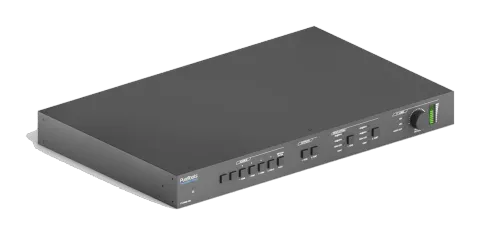
4x2 4K 18Gbps Multiformat Seamless Presentation Matrix Set
The 4x2 4K 18Gbps Multiformat Seamless Presentation Matrix Set is an AV matrix switcher that supports HDMI and USB-C signals with matrixed HDMI and HDBaseT outputs. It offers scaled output resolutions up to 4K@60Hz …
ManualControl (TCP/IP)FAQCEAvailable control interfaces. Expand an active type to see the full command table.
No matching commands.
RS232 Commands78 commandsActive
ConnectionBaud rate: 9600 Data bit: 8 Stop bit: 1 Parity bit: none All commands needs to be ended with “ <CR><LF> ”. In the commands, “ [ ”and “ ] ” are symbols for easy reading and do not need to be typed in actual operation. Type the command carefully, it is case-sensitive.↓ CSV
Source: manual, chapter RS232 Command, page 42
| Command | Description | Example | Response | |
|---|---|---|---|---|
| #SYS_SET_DEVICE_MODLE **** | Rename system model to ****. | #SYS_SET_DEVICE_MODLE PT-PMS-42S PT-PMS-42S | ||
| #SET_PWR_STATE ON | System on. | @PWR_STATE PWON | ||
| #SET_PWR_STATE OFF | System standby. | @PWR_STATE PWOFF | ||
| #GET_PWR_STATE | Get the system power status. | @PWR_STATE PWON @PWR_STATE PWOFF | ||
| #SET_KEYPAD_LOCK ON | Lock front panel buttons. | @KEYPAD_LOCK ON | ||
| #SET_KEYPAD_LOCK OFF | Unlock front panel buttons. | @KEYPAD_LOCK OFF | ||
| #GET_KEYPAD_LOCK | Get the front panel buttons locking status. | @KEYPAD_LOCK ON @KEYPAD_LOCK OFF | ||
| #GET_DEVICE_TYPE | Get system model. | PT-PMS-42S | ||
| #GET_DEVICE_IPADDR | Get GUI IP address. | @IP_ADDR: 192.168.0.178 | ||
| #FACTORY_RESET | Reset to factory default. | FACTORY_RESET | ||
| #GET_DEVICE_FIRMWAREINF | Get firmware version. | FIRMWARE V1.0.0 | ||
| #SET_PORT_RELAY 01 ON | Turn on PoC for HDBT output port. The PT-HDBT-210-RX receiver can be powered by the switcher. | @PORT_RELAY 01 ON | ||
| #SET_PORT_RELAY 01 OFF | Turn off PoC for HDBT output port. | @PORT_RELAY 01 OFF | ||
| #GET_PORT_RELAY 01 | Get PoC status. | @PORT_RELAY 00 @PORT_RELAY 01 | ||
| #SET_BADURATE_MODE [PARAM] | Set the baud rate of switcher to [PARAM]. [PARAM]=01~07 [PARAM] Baud Rate 01 2400 02 4800 03 9600 04 19200 05 38400 06 57600 07 115200 | #SET_BADURATE_MODE 05 | ||
| #UPDATE_MODE MAIN [PARAM] | Upgrade the 3458 IC of port [PARAM]. [PARAM]=01~04 (input port). [PARAM]=05~06 (output port). | #UPDATE_MODE MAIN 01 | @UPDATE_MODE MAIN 01 @Updating... @UPDATE_MODE MAIN: SUCCESS | |
| #UPDATE_MODE HDCP22 [PARAM] | Upgrade the HDCP 2.2 of port [PARAM]. [PARAM]=01~04 (input port). [PARAM]=05~06 (output port). | #UPDATE_MODE HDCP22 01 | @UPDATE_MODE HDCP22 01 @Updating... @UPDATE_MODE HDCP22: SUCCESS | |
| #SET_MODE_DOWNSCLAR ON | Enable video resolution down-scaling. | @DOWNSCLAR_MODE ON | ||
| #SET_MODE_DOWNSCLAR OFF | Disable video resolution down-scaling. | @DOWNSCLAR_MODE OFF | ||
| #GET_MODE_DOWNSCLA | Get video resolution down-scaling status. | @DOWNSCLAR_MODE ON @DOWNSCLAR_MODE OFF | ||
| #SET_AUTO_SWITCH [PARAM] ON | Enable the auto switching mode for the HDMI or HDBT output. [PARAM] = 01 (HDMI)/02 (HDBT) | #SET_AUTO_SWITCH 01 ON @AUTOSWITCH 01 ON | ||
| #SET_AUTO_SWITCH [PARAM] OFF | Disable the auto switching mode for the HDMI or HDBT output. [PARAM] = 01 (HDMI)/02 (HDBT) | #SET_AUTO_SWITCH 01 OFF @AUTOSWITCH 01 OFF | ||
| #GET_AUTO_SWITCH | Get the auto switching mode of HDMI and HDBT outputs. | @AUTOSWITCH 01 ON @AUTOSWITCH 02 OFF | ||
| #SET_AV [INPARAM] TO [OUTPARAM1] [OUTPARAM2]… | Switch input [INPARAM] to output [OUTPARAM1] [OUTPARAM2]… [INPARAM]=01 ~ 04 [OUTPARAM1] [OUTPARAM2]…= 01 ~ 02, ALL | #SET_AV 01 TO 02 #SET_AV 01 TO 01 02 #SET_AV 04 TO ALL @AV 01 TO 02 @AV 01 TO 01 02 @AV 04 TO ALL | ||
| #GET_AV | Get the input channel on output channel one by one. | @Video&Audio OUT 01 02 IN 04 04 | ||
| #GET_AV OUT [PARAM] | Get the input channel on output [PARAM]. [PARAM]=01~02. | #GET_AV OUT 01 @AV 01 TO 01 | ||
| #GET_AV IN [PARAM] | Get the output channel on input [PARAM]. [PARAM]=01~04. | #GET_AV IN 01 @AV 01 TO 01 02 | ||
| #SAVE_PRESET_MODE [PARAM] | Store the current switching status to preset [PARAM]. [PARAM]=01~ 10. | #SAVE_PRESET_MODE 01 @SAVE_PRESET_MODE 01 | ||
| #RECALL_PRESET_MODE [PARAM] | Recall the preset [PARAM]. [PARAM]=01~ 10. | #RECALL_PRESET_MODE 04 @CALL_PRESET_MODE 04 @Video&Audio OUT 01 02 IN 01 03 | ||
| #CLR_PRESET_MODE [PARAM] | Clear the preset [PARAM]. [PARAM]=01~ 10. | #CLR_PRESET_MODE 01 @CLEAR_PRESET_MODE 01 | ||
| #SET_IIS_SEL [PARAM] | Set the audio source of the audio output (L+R) port to [PARAM]. [PARAM]=01 ~ 02 01=HDMI output audio 02=HDBT output audio | #SET_IIS_SEL 01 @IIS_AUDIO 01 | ||
| #GET_IIS_SEL | Get the audio source of the audio output (L+R) port. | @IIS_AUDIO 01 | ||
| #SET_SPDIF_SEL [PARAM] | Set the audio source of the SPDIF output port to [PARAM]. [PARAM]=01 ~ 03 01=HDMI output audio 02=HDBT output audio 03=ARC audio from receiver | #SET_SPDIF_SEL 01 @SPDIF_AUDIO 01 | ||
| #GET_SPDIF_SEL | Get the audio source of the SPDIF output port. | @SPDIF_AUDIO 01 | ||
| #SET_AUDIO_ARC ON | Enable ARC mode of PT-HDBT-210-RX receiver. | @SET_AUDIO_ARC ON | ||
| #SET_AUDIO_ARC OFF | Disable ARC mode of PT-HDBT-210-RX receiver. | @SET_AUDIO_ARC OFF | ||
| #GET_AUDIO_ARC | Get the ARC status. | @SET_AUDIO_ARC ON @SET_AUDIO_ARC OFF | ||
| #SET_AUDIO_MUTE [PARAM] ON | Mute the audio [PARAM]. [PARAM]=01~05, ALL 01=HDMI output audio 02=HDBT output audio 03=MIX audio 04=MIC audio 05=L+R audio ALL=All audio. | #SET_AUDIO_MUTE 01 ON #SET_AUDIO_MUTE ALL ON @AUDIO_MUTE 01 ON @AUDIO_MUTE ALL ON | ||
| #SET_AUDIO_MUTE [PARAM] OFF | Unmute the audio [PARAM]. [PARAM]=01~05, ALL 01=HDMI output audio 02=HDBT output audio 03=MIX audio 04=MIC audio 05=L+R output audio ALL=All audio. | #SET_AUDIO_MUTE 01 OFF #SET_AUDIO_MUTE ALL OFF @AUDIO_MUTE 01 OFF @AUDIO_MUTE ALL OFF | ||
| #GET_AUDIO_MUTE [PARAM] | Get the output status of [PARAM] audio. [PARAM]=01~05, ALL 01=HDMI output audio 02=HDBT output audio 03=MIX audio 04=MIC audio 05=L+R output audio ALL=All audio. | #GET_AUDIO_MUTE 01 #GET_AUDIO_MUTE ALL @AUDIO MUTE 01 ON @AUDIO MUTE OUT 01 02 03 04 05 STA 01 01 01 01 01 | ||
| #SET_VOL [PARAM1] [PARAM2] | Set the volume of [PARAM1] audio to [PARAM2]. [PARAM1]=01~05 01=HDMI output audio 02=HDBT output audio 03=MIX audio 04=MIC audio 05=L+R output audio [PARAM2]=0~60 | #SET_VOL 01 60 @VOL HDMI 60 | ||
| #GET_VOL [PARAM] | Get the audio volume of output [PARAM]. [PARAM]= HDMI, HDBT, ALL. | #GET_VOL HDMI #GET_VOL ALL @VOL HDMI 60 @VOL HDBT 60 @VOL MIX 60 @VOL MIC 30 @VOL L+R 30 | ||
| #SET_AUDIO_EMBEDDED ON | Select the external balanced audio (5-pin) to be embed in 1.HDMI input. | @AUDIO_EMBEDDED ON | ||
| #SET_AUDIO_EMBEDDED OFF | Select the internal HDMI audio stream of source device for 1.HDMI input. | @AUDIO_EMBEDDED OFF | ||
| #GET_AUDIO_EMBEDDED 01 | Get the audio source of 1.HDMI input. | @AUDIO_EMBEDDED ON @AUDIO_EMBEDDED OFF | ||
| #SET_AUDIO_MIX [PARAM1] [PARAM2] | Enable/disable the output [PARAM1] audio to mix with MIX audio. [PARAM1]=01~02, ALL 01=HDMI Output 02=HDBT Output ALL=All outputs [PARAM2]=ON/OFF | #SET_AUDIO_MIX 01 ON #SET_AUDIO_MIX ALL ON @AUDIO_MIX 01 ON @AUDIO_MIX 01 OFF @AUDIO_MIX ALL OFF @AUDIO_MIX ALL ON | ||
| #GET_AUDIO_MIX [PARAM] | Get the MIX audio status of output [PARAM]. [PARAM]=01~02, ALL 01=HDMI Output 02=HDBT Output ALL=All outputs | #GET_AUDIO_MIX 01 #GET_AUDIO_MIX ALL @AUDIO_MIX 01 ON @AUDIO_MIX 02 OFF | ||
| #SET_AUDIO_MIC [PARAM1] [PARAM2] | Enable/disable the output [PARAM1] audio to mix with MIC audio. [PARAM1]=01~02, ALL 01=HDMI Output 02=HDBT Output ALL=All outputs [PARAM2]=ON/OFF | #SET_AUDIO_MIC 01 ON #SET_AUDIO_MIC ALL ON @AUDIO_MIC 01 ON @AUDIO_MIC 01 OFF @AUDIO_MIC ALL OFF @AUDIO_MIC ALL ON | ||
| #GET_AUDIO_MIC [PARAM] | Get the MIC audio status of output [PARAM]. [PARAM]=01~02, ALL 01=HDMI Output 02=HDBT Output ALL=All outputs | #GET_AUDIO_MIC 01 #GET_AUDIO_MIC ALL @AUDIO_MIC 01 OFF @AUDIO_MIC 02 OFF | ||
| #SET_OUTPUT_RES [PARAM1] TO [PARAM2] | Set the output resolution of output [PARAM2] to [PARAM1]. [PARAM2]=01~02 [PARAM2] Output 01 HDMI 02 HDBT [PARAM1]=1~10 1 4K@60HZ 4:4:4 2 4K@30Hz 4:4:4 3 1920X1200@60Hz 4 1080P@60Hz 5 1080P@50Hz 6 1600x1200@60Hz 7 1360x768@60Hz 8 1024x768@60Hz 9 720P@60Hz 10 720P@50Hz | #SET_OUTPUT_RES 01 TO 01 @OUTPUT_RES 4k@60 TO 01 | ||
| #GET_OUTPUT_RES [PARAM] | Get the video resolution of output [PARAM]. [PARAM]=01~02, ALL | #GET_OUTPUT_RES 01 @OUTPUT RES 1080@60 TO 01 | ||
| #SET_EDID_MODE CAL:[PARAM1] TO [PARAM2] | The HDMI input [PARAM2] invoke built-in EDID [PARAM1]. [PARAM1]=01~03 (EDID) [PARAM2]=01~03 (1.HDMI IN~3.HDMI IN) [PARAM1] EDID 01 1080P@60Hz 2CH 02 4K@30Hz 4:4:4 2CH 03 4K@60Hz 4:4:4 2CH | #SET_EDID_MODE CAL:01 TO 02 @EDID_MODE CAL:01 TO 02 | ||
| #SET_EDID_MODE LRN:[PARAM1] TO [PARAM2] | Set the EDID data of output [PARAM1] to input [PARAM2]. | |||
| #SEND_CECCMD [port]:00 | Confirm operation (Enter). | #SEND_CECCMD 03:00 [CEC]: blue ray OK. | ||
| #SEND_CECCMD [port]:01 | UP. | #SEND_CECCMD 03:01 [CEC]: blue ray up. | ||
| #SEND_CECCMD [port]:02 | DOWN. | #SEND_CECCMD 03:02 [CEC]: blue ray down. | ||
| #SEND_CECCMD [port]:03 | LEFT. | #SEND_CECCMD 03:03 [CEC]: blue ray left. | ||
| #SEND_CECCMD [port]:04 | RIGHT. | #SEND_CECCMD 03:04 [CEC]: blue ray right. | ||
| #SEND_CECCMD [port]:09 | Back to submenu. | #SEND_CECCMD 03:09 [CEC]: blue ray menu. | ||
| #SEND_CECCMD [port]:0D | Exit. | #SEND_CECCMD 03:0D [CEC]: blue ray Exit. | ||
| #SEND_CECCMD [port]:41 | Volume up. | #SEND_CECCMD 03:41 [CEC]: blue ray Volume Up. | ||
| #SEND_CECCMD [port]:42 | Volume down. | #SEND_CECCMD 03:42 [CEC]: blue ray Volume Down | ||
| #SEND_CECCMD [port]:44 | Play. | #SEND_CECCMD 03:44 [CEC]: blue ray play. | ||
| #SEND_CECCMD [port]:45 | Stop. | #SEND_CECCMD 03:45 [CEC]: blue ray stop. | ||
| #SEND_CECCMD [port]:46 | Pause. | #SEND_CECCMD 03:46 [CEC]: blue ray pause. | ||
| #SEND_CECCMD [port]:48 | Rewind | #SEND_CECCMD 03:48 [CEC]: blue ray backward. | ||
| #SEND_CECCMD [port]:49 | Fast forward. | #SEND_CECCMD 03:49 [CEC]: blue ray forward. | ||
| #SEND_CECCMD [port]:4B | Forward. | #SEND_CECCMD 03:4B [CEC]: blue ray skid forward. | ||
| #SEND_CECCMD [port]:4C | Backward. | #SEND_CECCMD 03:4C [CEC]: blue ray skid backward. | ||
| #SEND_CECCMD [port]:6C | Power off. | #SEND_CECCMD 03:6C [CEC]: Source Power off. | ||
| #SEND_CECCMD [port]:6D | Power on. | #SEND_CECCMD 03:6D [CEC]: Source Power on. | ||
| #SEND_CECCMD [port]:34 | Input channel selection. | #SEND_CECCMD 04:34 [CEC]: TV input select | ||
| #SEND_CECCMD [port]:41 | Volume up. | #SEND_CECCMD 04:41 [CEC]: TV VOL + | ||
| #SEND_CECCMD [port]:42 | Volume down. | #SEND_CECCMD 04:42 [CEC]: TV VOL - | ||
| #SEND_CECCMD [port]:43 | Mute | #SEND_CECCMD 04:43 [CEC]: TV VOL Mute | ||
| #SEND_CECCMD [port]:36 | Power off. | #SEND_CECCMD 04:36 [CEC]: TV Power off | ||
| #SEND_CECCMD [port]:04 | Power on. | #SEND_CECCMD 04:04 [CEC]: TV Power on | ||
| #SEND_[PARAM1]_[PARAM2]_[PARAM3]:XXXX | Send the ASCII or HEX command to control the third-party device. [PARAM1]=A/H: Represents the command format. [PARAM1] Command Format A ASCII H HEX [PARAM2]=01~02: Represents the RS232 port. [PARAM2] RS232 Port 01 The RS232 port of the switcher. 02 The RS232 port of the far-end HDBaseT receiver. [PARAM3]=01~07: Represents the baud rate |
RS232 Command5 commandsActive
Source: manual, chapter RS232 Command, page 53
| Command | Description | Example | Response | |
|---|---|---|---|---|
| #SEND_[PARAM1]_[PARAM2]_[PARAM3]:XXXX | Send the ASCII or HEX command to control the third-party device. [PARAM1]=A/H: Represents the command format. [PARAM1] | Command Format A | ASCII H | HEX [PARAM2]=01~02: Represents the RS232 port. [PARAM2] | RS232 Port 01 | The RS232 port of the switcher. 02 | The RS232 port of the far-end HDBaseT receiver. [PARAM3]=01~07: Represents the baud rate of third-party device. [PARAM3] | Baud Rate 01 | 2400 02 | 4800 03 | 9600 04 | 19200 05 | 38400 06 | 57600 07 | 115200 XXXX: ASCII or HEX characters. | #SEND_A_01_05:123456789 #SEND_H_02_05:30 31 32 33 34 | ||
| #SET_ON_[PARAM1]_[PARAM2]_[PARAM3]:XXXX | When power on system, automatically send the ASCII or HEX command to the third-party device. [PARAM1]=A/H: Represents the command format. [PARAM1] | Command Format A | ASCII H | HEX [PARAM2]=01~02: Represents the RS232 port. [PARAM2] | RS232 Port 01 | The RS232 port of the switcher. 02 | The RS232 port of the far-end HDBaseT receiver. [PARAM3]=01~07: Represents the baud rate of third-party device. [PARAM3] | Baud Rate 01 | 2400 02 | 4800 03 | 9600 04 | 19200 05 | 38400 06 | 57600 07 | 115200 XXXX: ASCII or HEX characters. | #SET_OF_A_01_03:123456789 #SET_OF_H_02_03:30 31 32 33 34 | ||
| #GET_ON_[PARAM1]_[PARAM2] | Get the feedback command which to be sent to the third-party device when the system is powered on. [PARAM1]=01~02: Represents the RS232 port. [PARAM1] | RS232 Port 01 | The RS232 port of the switcher. 02 | The RS232 port of the far-end HDBaseT receiver. [PARAM2]=01~07: Represents the baud rate of third-party device. [PARAM2] | Baud Rate 01 | 2400 02 | 4800 03 | 9600 04 | 19200 05 | 38400 06 | 57600 07 | 115200 | |||
| #SET_OF_[PARAM1]_[PARAM2]_[PARAM3]:XXXX | When power off system or enter system standby mode, automatically send the ASCII or HEX command to the third-party device. [PARAM1]=A/H: Represents the command format. [PARAM1] | Command Format A | ASCII H | HEX [PARAM2]=01~02: Represents the RS232 port. [PARAM2] | RS232 Port 01 | The RS232 port of the switcher. 02 | The RS232 port of the far-end HDBaseT receiver. [PARAM3]=01~07: Represents the baud rate of third-party device. [PARAM3] | Baud Rate 01 | 2400 02 | 4800 03 | 9600 04 | 19200 05 | 38400 06 | 57600 07 | 115200 XXXX: ASCII or HEX characters. | #SET_OF_A_01_03:123456789 #SET_OF_H_02_03:30 31 32 33 34 | ||
| #GET_OF_[PARAM1]_[PARAM2] | Get the feedback command which to be sent to the third-party device when the system is powered off or enter standby mode. [PARAM1]=01~02: Represents the RS232 port. [PARAM1] | RS232 Port 01 | The RS232 port of the switcher. 02 | The RS232 port of the far-end HDBaseT receiver. [PARAM2]=01~07: Represents the baud rate of third-party device. [PARAM2] | Baud Rate 01 | 2400 02 | 4800 03 | 9600 04 | 19200 05 | 38400 06 | 57600 07 | 115200 |