
Discontinued
PT-PMS-82S
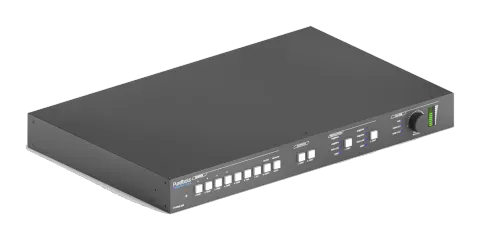
8x2 4K 18Gbps Multiformat Seamless Presentation Matrix Set
The 8x2 4K 18Gbps Multiformat Seamless Presentation Matrix Set is an AV matrix switcher supporting HDMI, HDBaseT, USB-C, VGA, and DisplayPort signals, with matrixed HDMI and HDBaseT outputs. It delivers scaled output …
ManualControl (TCP/IP)FAQFirmwareCEAvailable control interfaces. Expand an active type to see the full command table.
No matching commands.
RS232 Commands107 commandsActive
Source: manual, chapter RS232 Control, page 40
| Command | Description | Example | Response | |
|---|---|---|---|---|
| PWON. | Power on system. | PWON | ||
| PWOFF. | Power off system. Turn off HDBaseT power supply. | PWOFF | ||
| STANDBY. | System standby. Press any button to awake. | STANDBY | ||
| /*Type; | Report system model. | PT-PMS-82S | ||
| /^Version; | Report firmware version. | V1.0.0 | ||
| %Lock; | Lock front panel buttons. | System Locked | ||
| %Unlock; | Unlock front panel buttons. | System Unlock! | ||
| %9964. | Report IP address. | IP:192.168.0.178 | ||
| USBUpdata:[x]. | Upgrade the 3458 IC. After successfully upgrading, send the command “SPI:15,0.” to turn off the serial communication between the 3458 IC and control PC. | |||
| %9961. | Report the system locking status. | System UnLock/Lock! | ||
| %9962. | Report the system power status. | PWON/PWOFF/STANDBY | ||
| %9963. | Report the IR carrier mode. | Carrier native | ||
| %0911. | Reset to factory default. | |||
| Demo. | Switch to demo testing mode, switch AV 1>1, 2>2 and so on. | Demo Mode AV: AV: 1-> 1 AV: 1-> 2 … AV: 1-> 7 AV: 1-> 8 AV: 2-> 1 AV: 2-> 2 … AV: 2-> 7 AV: 2-> 8 Normal Mode | ||
| Undo. | Cancel the previous operation. | Undo Ok! | ||
| [x]All. | Switch input [x] to HDMI and HDBT outputs. x=1~4. | 4ALL. | Example: 4ALL. Feedback: 4 To All | |
| All#. | Switch all input signal to the corresponding output channel. 1->1, 2->2 | All Through. | ||
| All$. | Turn off all output. | All Closed. | ||
| [x]#. | Switch input [x] to output [x]. x=1~2. | 1 Through | ||
| [x]$. | Turn off output [x]. x=1~2. | 1 Closed. | ||
| [x]@. | Turn on output [x]. x=1~2. | 01 Open. | ||
| All@. | Turn on all outputs. | All Open | ||
| [x]B[y]. | Switch input [x] to output [y]. x=1~8, y=1~2. | AV: 1-> 1 | ||
| %9975. | Report the source switching status. | Out 1 2 In 4 4 | ||
| Status[x]. | Report the output [x] status. x=1~2 | AV: 5-> 1 | ||
| Status. | Report the input channel on output channel one by one. | AV:01->01 AV:01->02 | ||
| %9971. | Report the connection status of all inputs. Y means the corresponding input port is connected to a source device, N means not. | In 01 02 03 04 Connect Y Y N N In 05 06 07 08 Connect N N N Y | ||
| AutomationON[X]. | Enable the auto switching mode for the output [X]. X Output Port 1 HDMI 2 HDBT | HDMI Automation ON HDBT Automation ON | ||
| AutomationOFF[X]. | Disable the auto switching mode for the output [X]. X Output Port 1 HDMI 2 HDBT | HDMI Automation OFF HDBT Automation OFF | ||
| Save[y]. | Store the current switching status to preset [y]. y=0~ 9. | Save To F0 | ||
| Recall[y]. | Recall the preset [y]. y=0~ 9. | Recall From F0 | ||
| Clear[y]. | Clear the preset [y]. | Clear F0 | ||
| VRES/X:Y. | Set the output resolution of port [X] to [Y]. 1) X=9/10: X Output Port 9 HDMI 10 HDBT 2) Y=1~10: Y Resolution 1 4K@60Hz 2 4K@30Hz 3 1920X1200@60Hz 4 1080P@60Hz 5 1080P@50Hz 6 1600x1200@60Hz 7 1360x768@60Hz 8 1024x768@60Hz 9 720P@60Hz 10 720P@50Hz | Outport HDMI:720p@50Hz Outport HDBT:720p@50Hz | ||
| Embedded:[x]. | Select external balanced audio (L+R) for input [x]. x=1~3. | HDBT1 Embedded | ||
| UnEmbedded:[x]. | Select internal audio for input [x]. x=1~3. | HDBT1 UnEmbedded | ||
| MIXOUT:[x]. | The output [x] audio is mixed with MIX audio. | HDMI1 OUT MIX | ||
| UnMIXOUT:[x]. | The output [x] audio is not mixed with MIX audio. | HDMI1 OUT UnMIX | ||
| SetHDMIVol:xx. | Set the HDMI output audio volume to xx. xx=0~60. | Volume of HDMI: 30. | ||
| HDMIVolume+. | Increase the HDMI output audio volume. | Volume of HDMI: 31. | ||
| HDMIVolume-. | Decrease the HDMI output audio volume. | Volume of HDMI: 29. | ||
| HDMIMute. | Mute the HDMI output audio. | HDMI Mute. | ||
| HDMIUnmute. | Unmute the HDMI output audio. | HDMI Unmute. | ||
| SetHDBTVol:xx. | Set the HDBT output audio volume to xx. xx=0~60. | Volume of HDBT: 30. | ||
| HDBTVolume+. | Increase the HDBT output audio volume. | Volume of HDBT: 31. | ||
| HDBTVolume-. | Decrease the HDBT output audio volume. | Volume of HDBT: 29. | ||
| HDBTMute. | Mute the HDBT output audio. | HDBT Mute. | ||
| HDBTUnmute. | Unmute the HDBT output audio. | HDBT Unmute. | ||
| SetMIXVol:XXX. | Set the MIX input audio volume to xx. xx=0~60. | Volume of MIX: 30. | ||
| MIXVolume+. | Increase the MIX input audio volume. | Volume of MIX: 31. | ||
| MIXVolume-. | Decrease the MIX input audio volume. | Volume of MIX: 29. | ||
| MIXMute. | Mute the MIX input audio. | MIX Mute. | ||
| MIXUnmute. | Unmute the MIX input audio. | MIX Unmute. | ||
| %9941. | Report the audio status. | HDBT Unmute. HDMI Mute. MIX Mute. | ||
| %9942. | Report the audio volume. | Volume of HDBT: 9. Volume of HDMI: 30. Volume of MIX: 6. | ||
| %9943. | Report the external audio status. | HDBT1 UnEmbedded HDMI2 Embedded HDMI3 Embedded | ||
| EDID/[x]/[y]. | The input [x] invoke built-in EDID [y]. x=1~5, 7. y EDID 1 1080P@60Hz 2 4K@30Hz 4:4:4 3 4K@60Hz 4:4:4 | EDID/4/1 | ||
| EDIDUpgrade[x]. | Upgrade the EDID data of the input port [x]. x=1~5, 7. When the command applied, system prompts to upload the EDID file (.bin). Operation will be cancelled in 10 seconds. Please disconnect HDBT connection before sending command to ensure the data can be received successfully. | |||
| EDIDM[x]B[y]. | Set the EDID data of output [x] to input [y]. x=1~2, y=1~5, 7. | EDIDM1B1. | Input 1 EDID Upgrade OK By 01 EXT EDID! | |
| EDIDMInit. | Reset factory default EDID to all input ports. | All input EDID Set Default 1080P! | ||
| RelayON[X]. | Turn on relay [X], X=1~2. | |||
| RelayOFF[X]. | Turn off relay [X], X=1~2. | |||
| RelayAutomationCtl:[X],[Y]. | Set the auto stop time of relay [X] to Y seconds. X=1~2, Y=0~20. | |||
| ToggleRelay[X]. | Toggle relay [X], X=1~2. | |||
| SetVGAPhase:XX. | Set the phase position to XX. XX=0~100. | |||
| SetVGABrightness: XX. | Set the brightness to XX. XX=0~100. | |||
| SetVGAContrast: XX. | Set the contrast to XX. XX=0~100. | |||
| SetVGAColor: XX. | Set the color to XX. XX=0~100. | |||
| SetVGAAutoSync:X. | X=0, Disable Auto-Sync mode. X=1, Enable Auto-Sync mode. | |||
| SetVGASharpness:XX. | Set the sharpness to XX. XX=0~100. | |||
| SetVGAColorTemp:X. | Auto-adjust the color temperature to X. X=0~3 (Normal/Cool/Warm) | |||
| SetVGAAspetRatio:X. | Set the aspect ratio to X. X=0~2 (16:9/4:3/auto) | |||
| SetVGAPicMode:X. | Set the image mode to X. X=0~3. (dynamic/standard/mild/user) | |||
| Baudrate 2400. | Set the RS232 baud rate of switcher to 2400. | Set Local RS232 baudrate is 2400! | ||
| Baudrate 4800. | Set the RS232 baud rate of switcher to 4800. | Set Local RS232 baudrate is 4800! | ||
| Baudrate 9600. | Set the RS232 baud rate of switcher to 9600. | Set Local RS232 baudrate is 9600! | ||
| Baudrate 19200. | Set the RS232 baud rate of switcher to 19200. | Set Local RS232 baudrate is 19200! | ||
| Baudrate 38400. | Set the RS232 baud rate of switcher to 38400. | Set Local RS232 baudrate is 38400! | ||
| Baudrate 57600. | Set the RS232 baud rate of switcher to 57600. | Set Local RS232 baudrate is 57600! | ||
| Baudrate 115200. | Set the RS232 baud rate of switcher to 115200. | Set Local RS232 baudrate is 115200! | ||
| CECON. | Enable CEC | CEC Turn ON! | ||
| CECOFF. | Disable CEC | CEC Turn OFF! | ||
| CECI[port]00. | Confirm operation (Enter). | CECI0100. | [CEC]: blue ray OK. | |
| CECI[port]01. | UP. | CECI0101. | [CEC]: blue ray up. | |
| CECI[port]02. | DOWN. | CECI0102. | [CEC]: blue ray down. | |
| CECI[port]03. | LEFT. | CECI0103. | [CEC]: blue ray left. | |
| CECI[port]05. | RIGHT. | CECI0105. | [CEC]: blue ray right. | |
| CECI[port]09. | Back to submenu. | CECI0109. | [CEC]: blue ray menu. | |
| CECI[port]0D. | Exit. | CECI010D. | [CEC]: blue ray Exit. | |
| CECI[port]41. | Volume up. | CECI0141. | [CEC]: Source VOL + | |
| CECI[port]42. | Volume down. | CECI0142. | [CEC]: Source VOL - | |
| CECI[port]44. | Play. | CECI0144. | [CEC]: blue ray play. | |
| CECI[port]45. | Stop. | CECI0145. | [CEC]: blue ray stop. | |
| CECI[port]46. | Pause. | CECI0146. | [CEC]: blue ray pause. | |
| CECI[port]48. | Rewind. | CECI0148. | [CEC]: blue ray backward. | |
| CECI[port]49. | Fast forward. | CECI0149. | [CEC]: blue ray forward. | |
| CECI[port]4B. | Forward. | CECI014B. | [CEC]: blue ray skid forward. | |
| CECI[port]4C. | Backward. | CECI014C. | [CEC]: blue ray skid backward. | |
| CECI[port]6C. | Power off. | CECI016C. | [CEC]: Source Power off. | |
| CECI[port]6D. | Power on. | CECI016D. | [CEC]: Source Power on. | |
| CECO[port]34. | Input channel selection. | CECO0634. | [CEC]: TV input select | |
| CECO[port]41. | Volume up. | CECO0641. | [CEC]: TV VOL + | |
| CECO[port]42. | Volume down. | CECO0642. | [CEC]: TV VOL - | |
| CECO[port]43. | Mute | CECO0643. | [CEC]: TV VOL Mute | |
| CECO[port]36. | Power off. | CECO0636. | [CEC]: TV Power off | |
| CECO[port]04. | Power on. | CECO0604. | [CEC]: TV Power on | |
| UARTPassThrough:Y. | RS232 mode selection: Y=0, Local Control: The RS232 port of the switcher is used to connect control device (e.g. PC) to control the switcher. Y=1, HDBT Transmitter Pass Through: Establish RS232 pass-through communication between the switcher and the HDBaseT transmitter (e.g. PT-HDBT-200-TX). The RS232 port of the switcher can be used to transfer commands to control the third-party device which is connected to the HDBaseT transmitter. Y=2, HDBT Receiver Pass Through: Establish RS232 pass-through communication between the switcher and HDBaseT receiver (e.g.PT-HDBT-200-RX). The RS232 port of the switcher can be used to transfer commands to control the third-party device which is connected to the HDBaseT receiver. | |||
| /+[Y]/[X]:******. | xxx: ASCII characters. Y: Represents the RS232 port. 1) Y=1: The RS232 port of switcher. 2) Y=2: The RS232 port of HDBaseT receiver. 3) Y=3: The RS232 port of HDBaseT transmitter. X: Represents the baud rate of third-party device. 1) X=1, 2400 2) X=2, 4800 3) X=3, 9600 4) X=4, 19200 5) X=5, 38400 6) X=6, 57600 7) X=7, 115200 | /+3/3:123456. |
RS232 Control1 commandsActive
Connection[Y]/[X]:******. | xxx: ASCII characters. Y: Represents the RS232 port. 1) Y=1: The RS232 port of switcher. 2) Y=2: The RS232 port of HDBaseT receiver. 3) Y=3: The RS232 port of HDBaseT transmitter. X: Represents the baud rate of third-party device. 1) X=1, 2400 2) X=2, 4800 3) X=3, 9600 4) X=4, 19200 5) X=5, 38400 6) X=6, 57600 7) X=7, 115200↓ CSV
Source: manual, chapter RS232 Control, page 52
| Command | Description | Response | |
|---|---|---|---|
| /+3/3:123456. | Send the command “123456” to the third-party device. The baud rate is 9600. |