
Discontinued
PT-PSW-21HC-KVM
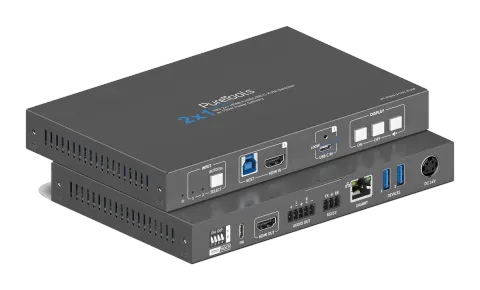
2x1 USB-C / HDMI Presentation Switcher with 100W PD
The PT-PSW-21HC-KVM is a multi-format presentation switcher supporting video signals up to 4K 60Hz 4:4:4 with HDR10 and Dolby Vision via USB-C DP Alt-Mode or HDMI inputs, and includes a dedicated USB-B port for legacy …
ManualControl (TCP/IP)SpecificationsDatasheetTechnical drawingWeb GUICE declaration ↗Available control interfaces. Expand an active type to see the full command table.
No matching commands.
RS-232 Commands29 commandsActive
ConnectionCommunication protocol: RS232 Communication Protocol Baud rate: 9600 Data bit: 8 Stop bit: 1 Parity bit: none↓ CSV
Source: manual, chapter RS232 Control, page 21
| Command | Description | Example | Response | |
|---|---|---|---|---|
| POWON. | Power on | Power On! | ||
| POWOFF. | Power off | Power Off! | ||
| HDMI[x]. | Input source selection. x = 1(HDMI IN 1 selected) x = 2(USB-C IN 2 selected) | HDMI1. HDMI Out Switch To 01! | ||
| HDMIA. | Auto-switch mode on | HDMI Out Switch Auto Mode! | ||
| HDMIM. | Manual-switch mode on | HDMI Out Switch Manual Mode! | ||
| LOCK. | Turn on front panel lock | Front Panel Locked! | ||
| UNLOCK. | Turn off front panel lock | Front Panel UnLock! | ||
| RST. | Restore Factory | Factory Default! | ||
| SIGNALTRG[xx]MODE. | When setting the detection mode xx=1, it is 5V detection, and when it is xx=2, it is TMDS detection. | SIGNALTRG01MODE. Set Trigger Mode To 5V. | ||
| SIGNALTRGSTA. | Query the method of signal detection (TMDS or 5V) | Trigger Mode Is 5V. | ||
| STA. | Status query | ...... | ||
| KEYCOMMAND[X]. | Set display key command(CEC,RS232) | KEYCOMMAND1. Display Key Command CEC And RS232! KEYCOMMAND2. Display Key Command Only CEC! KEYCOMMAND3. Display Key Command Only RS232! | ||
| SetDevicePowerMode[XX]. | Set the device power supply mode. XX = 00-01 00: Follow Host 01: Always On | SetDevicePowerMode 00. SetDevicePowerMode: Follow Host! | ||
| SETSTANDBYTIME[yy]. | Set the delay time for disconnecting 5V output after no source :3-1800(unit: seconds) | SETSTANDBYTIME10. Set POFF Delay To 10 Second(s)! | ||
| TVON. | Turn on by CEC control | CEC_TV_POWON! | ||
| TVOFF. | Turn off by CEC control | CEC_TV_POWOFF! | ||
| TVMUTE. | TV mute by CEC control | CEC_TV_VOLMUTE/UNMUTE! | ||
| AOUTOFF. | Audio de-embedding off | Audio De-embedding Off! | ||
| AOUTON. | Audio de-embedding on | Audio De-embedding On! | ||
| CEC[I/O][port][command]. | I/O: Input or Output port port: Port number command: CEC command, HEX format (max12 bytes) | CECI0104444A.(Disc player unloaded) CECO018004.(TV on) CECO018036.(TV standby) CEC Input 01 Send Success! CEC Output 01 Send Success! | ||
| /+[X]:XXX. | RS232 sends commands to control peripheral devices. [X] = 1~7 (Baud Rate) 1--2400;2--4800;3--9600;4--19200;5--38400;6--57600;7--115200 XXX: Any ASCII code | /+3:123456. 123456 | ||
| CMDON/+[X]:XXX. | Set the ASCII RS232 command XXX to be sent to control the third-party device when the DISPLAY ON button is pressed. [X] = 1~7 (Baud Rate) | CMDON/+3:455665. CMD_ON Save Success! | ||
| CMDOFF/+[X]:XXX. | Set the ASCII RS232 command XXX to be sent to control the third-party device when the DISPLAY OFF button is pressed. [X] = 1~7 (Baud Rate) | CMDOFF/+3:455665. CMD_OFF Save Success! | ||
| CMDVOLMUTE/+[X]:XXX. | Set the ASCII RS232 command XXX to be sent to control the third-party device when the VOLUME MUTE button is pressed. [X] = 1~7 (Baud Rate) | CMDVOLMUTE/+3:455665. CMD_VOLMUTE Save Success! | ||
| EDIDUpgrade[xx]. | The serial port upgrades EDID data. 1. [xx]=00-02 means to customize the EDID of the corresponding input port (EDID is switched to the custom EDID after customization, and will not be saved in the machine); 00 :All input ports 01-02 :Input 01-02; 2. [xx]=U1 means custom built-in EDID (can be saved in the machine and recalled at any time), only one built-in EDID can be customized, and the current EDID still used after the customization is completed will not switch to the customized EDID . After receiving the instruction, the machine will prompt to send the EDID file. The file format must be .bin within 10s (in order to ensure normal data reception, all HDBaseT must be disconnected before sending the instruction). | EDIDUpgrade01. EDIDUpgradeU1. Input XX/User Define EDID Upgrade OK! | ||
| Baudrate[XXX]. | Set control baud rate. [XXX] Support 2400, 4800, 9600, 19200, 38400, 57600, 115200. | Baudrate9600. Set Local RS232 Baudrate To 9600! | ||
| STA_HDCP. | Query the current HDCP status | STA_HDCP. DIP Passive, HDCP Management! | ||
| HDCP_ON. | Forced to open the output HDCP, output HDCP1.4. | HDMI Out HDCP On! | ||
| HDCP_DIP. | Select HDCP definition of DIP Switch | HDCP_DIP. DIP Passive, HDCP Management! DIP Active, HDMI Out HDCP Follow Display! |