
DiscontinuedReplaced by PT-PSW-41H
PT-PSW-41E
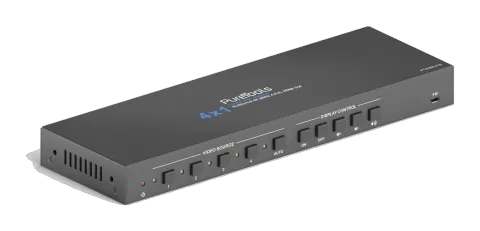
4x1 4K 18Gbps Multiformat Presentation Switcher
The PureTools 4x1 Multiformat Presentation Switcher (41E model) allows switching between 3 HDMI and 1 DisplayPort inputs to a single HDMI output, utilizing advanced auto sense, front panel, IR, or GUI control. It …
ManualControl (TCP/IP)SpecificationsDatasheetHas successorFirmwareCEAvailable control interfaces. Expand an active type to see the full command table.
No matching commands.
RS-232 Commands1 commandsActive
ConnectionBaud Rate: Supports 2400, 4800, 9600, 19200, 38400, 57600 or 115200.
Command Ending: NULL, CR, LF or CR+LF can be chosen.↓ CSV
Source: manual, chapter RS232 Tab, page 23
| Command | Description | Response | |
|---|---|---|---|
| Type the command in this box to control the third-party device which is connected to the RS232 port of the switcher. | Control the third-party device connected to the RS232 port of the switcher. |
RS-232 Commands51 commandsActive
Source: manual, chapter RS232 Command, page 30
| Command | Description | Example | Response | |
|---|---|---|---|---|
| POWON. | Power on system. | Power ON! | ||
| POWOFF. | System standby. | Power OFF! | ||
| LOCK. | Lock front panel buttons. | Front Panel Locked! | ||
| UNLOCK. | Unlock front panel buttons. | Front Panel UnLock! | ||
| Baudrate[xxx]. | Set baud rate to [xxx]. xxx = 115200, 57600, 38400, 19200, 9600, 4800 or 2400. | Example: Baudrate2400. Feedback: Set Local RS232 Baudrate Is 2400! | ||
| GETGUIIP. | Report GUI IP. | GUI_IP:192.168.0.178 | ||
| SETGUIIP:[xxx.xxx.xxx.xxx]. | Set GUI IP to [xxx.xxx.xxx.xxx]. | Example: SETGUIIP:192.168.0.18. Feedback: SETGUIIP:192.168.0.18! | ||
| STA. | Report system status. | … … | ||
| RST. | Factory reset. | Factory Default! | ||
| HDMI[x]. | Switch to HDMI input [x]. x=1~4. | HDMI4. | HDMI Out Switch To 04! | |
| HDMIA. | Enable auto switching mode. | HDMI Out Switch Auto Mode! | ||
| HDMIM. | Enable manual switching mode. | HDMI Out Switch Manual Mode! | ||
| EDIDR[xxxx]. | Read the preset EDID. [xxxx] represents the 4-pin DIP switch status. | EDID_0001! … | ||
| EDIDUSE[xxxx]. | Invoke the preset EDID. [xxxx] represents the 4-pin DIP switch status. Please refer to the 5.4 EDID Setting. Note: When invoke the preset EDID, the 4-pin EDID DIP switch on the rear panel must be in the “1111” status. | EDIDUSE0001! EDID_RS232&GUI_MODE! EDID0001! | ||
| EDIDW[xxxx]. | User-define EDID. xxxx = 1011, 1100, 1101 or 1110. Operation: Step 1: Prepare the EDID file (.bin). Step 2: Set the 4-pin DIP switch to “1111” status. Step 3: Send the command “EDIDW1101.”, and the feedback is “Please Send The EDID File!”. Step 4: Send the EDID file (.bin). If successfully upload, the feedback is: “Received The File! Length=256! EDID1101 Update OK!” | |||
| IISON. | Turn on the stereo analog L/R audio output. | IIS_OUT_ON! | ||
| IISOFF. | Turn off the stereo analog L/R audio output. | IIS_OUT_OFF! | ||
| SPDIFON. | Turn on the Toslink digital audio output. | SPDIF_OUT_ON! | ||
| SPDIFOFF. | Turn off the Toslink digital audio output. | SPDIF_OUT_OFF! | ||
| TVON. | Power on the display. | CEC_TV_POWON! | ||
| TVOFF. | Power off the display. | CEC_TV_POWOFF! | ||
| TVVOL+. | Increase the display audio. | CEC_TV_VOLUP! | ||
| TVVOL-. | Decrease the display audio. | CEC_TV_VOLDOWN! | ||
| TVMUTE. | Mute/unmute the display. | CEC_TV_VOLMUTE/UNMUTE! | ||
| CECI[port]00. | Confirm operation (Enter). | CECI0100. | CECI0100. CEC_IN_01_SEND_SUCCESS! | |
| CECI[port]01. | UP. | CECI0101. | CECI0101. CEC_IN_01_SEND_SUCCESS! | |
| CECI[port]02. | DOWN. | CECI0102. | CECI0102. CEC_IN_01_SEND_SUCCESS! | |
| CECI[port]03. | LEFT. | CECI0103. | CECI0103. CEC_IN_01_SEND_SUCCESS! | |
| CECI[port]04. | RIGHT. | CECI0104. | CECI0104. CEC_IN_01_SEND_SUCCESS! | |
| CECI[port]0A. | Enter main menu. | CECI010A. | CECI010A. CEC_IN_01_SEND_SUCCESS! | |
| CECI[port]0D. | Exit menu. | CECI010D. | CECI010D. CEC_IN_01_SEND_SUCCESS! | |
| CECI[port]41. | Volume up. | CECI0141. | CECI0141. CEC_IN_01_SEND_SUCCESS! | |
| CECI[port]42. | Volume down. | CECI0142. | CECI0142. CEC_IN_01_SEND_SUCCESS! | |
| CECI[port]43. | Mute | CECI0143. | CECI0143. CEC_IN_01_SEND_SUCCESS! | |
| CECI[port]44. | Play. | CECI0144. | CECI0144. CEC_IN_01_SEND_SUCCESS! | |
| CECI[port]45. | Stop. | CECI0145. | CECI0145. CEC_IN_01_SEND_SUCCESS! | |
| CECI[port]46. | Pause. | CECI0146. | CECI0146. CEC_IN_01_SEND_SUCCESS! | |
| CECI[port]48. | Rewind. | CECI0148. | CECI0148. CEC_IN_01_SEND_SUCCESS! | |
| CECI[port]49. | Fast forward. | CECI0149. | CECI0149. CEC_IN_01_SEND_SUCCESS! | |
| CECI[port]4B. | Forward. | CECI014B. | CECI014B. CEC_IN_01_SEND_SUCCESS! | |
| CECI[port]4C. | Backward. | CECI014C. | CECI014C. CEC_IN_01_SEND_SUCCESS! | |
| CECI[port]6C. | Power off. | CECI016C. | CECI016C. CEC_IN_01_SEND_SUCCESS! | |
| CECI[port]6D. | Power on. | CECI016D. | CECI016D. CEC_IN_01_SEND_SUCCESS! | |
| CECO[port]41. | Volume up. | CECO0141. | CECO0141. CEC_OUT_01_SEND_SUCCESS! | |
| CECO[port]42. | Volume down. | CECO0142. | CECO0142. CEC_OUT_01_SEND_SUCCESS! | |
| CECO[port]43. | Mute | CECO0143. | CECO0143. CEC_OUT_01_SEND_SUCCESS! | |
| CECO[port]6C. | Power off. | CECO016C. | CECO016C. CEC_OUT_01_SEND_SUCCESS! | |
| CEO[port]6D. | Power on. | CECO016D. | CECO016D. CEC_OUT_01_SEND_SUCCESS! | |
| /+[B]:xxx. | xxx: ASCII string. The “B” represents the baud rate of third-party device. B=1, the baud rate is 2400 B=2, the baud rate is 4800 B=3, the baud rate is 9600 B=4, the baud rate is 19200 B=5, the baud rate is 38400 B=6, the baud rate is 57600 B=7, the baud rate is 115200 | /+3:123456. | Send the command “123456” to the third-party whose baud rate is 9600. | |
| CMDON/+[B]:xxx. | Power on the third-party device. | CMDON/+3:455665. | ||
| CMDOFF/+[B]:xxx. | Power off the third-party device. | CMDOFF/+3:455666. |