
Discontinued
PT-PSW-41RS
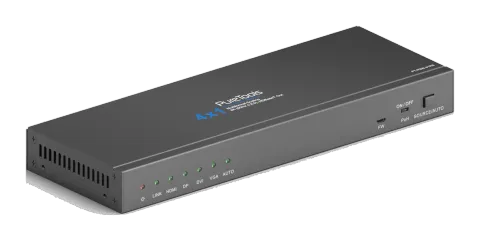
PureTools - Scaler Switcher 4x1, 4K, HDBT Output
PureTools - Scaler Switcher 4x1, 4K, HDBT Output.
ManualControl (TCP/IP)FAQSpecificationsFirmwareCEAvailable control interfaces. Expand an active type to see the full command table.
No matching commands.
IR Control via RS-2322 commandsActive
Source: manual, chapter IR Control, page 15
| Command | Description | Response | |
|---|---|---|---|
| 50782% | Set to IR Mode 2 (factory default), to control the Scaler Switcher by using IR remote. | ||
| 50781% | Set to IR Mode 1, to control the far-end display device (such as HDTV) locally by using its IR remote. |
RS232 Commands32 commandsActive
Connectionbaud rate: 2400, 4800, 9600, 19200, 38400, 57600 or 115200; data bits, stop bits and parity bit to be set correctly in control software↓ CSV
Source: manual, chapter RS232 Control, page 20
| Command | Description | Response | |
|---|---|---|---|
| 50701% | Switch to HDMI input | Switch to HDMI | |
| 50702% | Switch to DP input | Switch to DP | |
| 50703% | Switch to DVI input | Switch to DVI | |
| 50704% | Switch to VGA input | Switch to VGA | |
| 50680% | Convert into VGA signal format for VGA input | Input VGA Set & Switch to VGA 1 | |
| 50681% | Convert into YPbPr signal format for VGA input | Input VGA Set & Switch to YPbPr 1 | |
| 50682% | Convert into C-video signal format for VGA input | Input VGA Set & Switch to AV 1 | |
| 50683% | Convert into VGA signal format for DVI input | Input DVI Set & Switch to VGA 2 | |
| 50684% | Convert into YPbPr signal format for DVI input | Input DVI Set & Switch to YPbPr 2 | |
| 50685% | Convert into C-video signal format for DVI input | Input DVI Set & Switch to AV 2 | |
| 50686% | Convert into digital signal format for DVI input | Input DVI Set & Switch to Digital | |
| 50770% | Enable auto-switching | Auto Switching | |
| 50771% | Disable auto-switching | Manual Switching | |
| 50708% | Select the embedded audio as DVI audio input | DVI Audio from Embedded | |
| 50709% | Select the external audio as DVI audio input | DVI Audio from Embedded | |
| 50619% | Set the output resolution to 1360x768 HD | Resolution: 1360x768 | |
| 50620% | Set the output resolution to 1920X1200 WUXGA | Resolution: 1920x1200 | |
| 50621% | Set the output resolution to 1600X1200 UXGA | Resolution: 1600x1200 | |
| 50626% | Set the output resolution to 1024X768 XGA | Resolution: 1024x768 | |
| 50627% | Set the output resolution to 1280X720 720P | Resolution: 1280x720 | |
| 50628% | Change the resolution to 1280X800 WXGA | Resolution: 1280x800 | |
| 50629% | Set the output resolution to 1920X1080 1080P | Resolution: 1920x1080 | |
| 50779% | RS232 control mode 1: Control the far-end third-party device by sending RS232 commands via PC, | RS232 Mode 1: Enable RS232 Control Remote | |
| 50780% | RS232 control mode 2: Control the Scaler Switcher by sending RS232 commands via PC. | RS232 Mode 2: Disable RS232 Control Remote | |
| 50781% | IR control mode 1:Control the far-end third-party device by using its IR remote. | IR Mode 1:IR Control Remote | |
| 50782% | IR control mode 2: Control the Scaler Switcher by using IR remote. | IR Mode 2:IR Control Scaler | |
| 50772% | EDID pass-through mode | EDID:bypass mode | |
| 50773% | EDID 1080P 2PCM | EDID:1080P&PCM 2ch | |
| 50774% | EDID 1080P 5.1 | EDID:1080P&5.1ch | |
| 50775% | EDID 1080P3D 5.1 | EDID:1080P3d&5.1ch | |
| 50776% | EDID 1080I 2PCM | EDID:1080i&PCM 2ch | |
| 50777% | EDID 4K*2K 2PCM | EDID:4K&PCM 2ch |
Image Setup Commands8 commandsActive
Source: manual, chapter Image Setup Commands, page 23
| Command | Description | Response | |
|---|---|---|---|
| 502xx% | Set the brightness to xx. | Brightness: xx (xx=00~99) | |
| 503xx% | Set the contrast to xx. | Contrast: xx (xx=00~99) | |
| 504xx% | Set the saturation to xx. | Saturation: xx (xx=00~99) | |
| 505xx% | Set the sharpness to xx. | Sharpness: xx (xx=00~99) | |
| 50606% | Auto-adjust the input parameter for VGA signal | VGA Input Auto | |
| 50607% | Adjust the color temperature | Color Temperature: xx (xx= Cool/ Medium/ Warm/ User.) | |
| 50608% | Set the aspect ratio | Aspect Ratio: xx (xx= 16:9/ 4:3/auto | |
| 50614% | Set the picture mode | Picture Mode: xx (xx= dynamic/standard/ mild/ user) |
RS-232 Commands7 commandsActive
Source: manual, chapter Image adjustment Commands, page 23
| Command | Description | Response | |
|---|---|---|---|
| 50678% | Enable screen output adjusting | Enter Output Position Adjust | |
| 50679% | Disable screen output adjusting | Exit Output Position Adjust | |
| 50670% | Move the image to left | Output Position Adjust X xx | |
| 50671% | Move the image to right | Output Position Adjust X xx | |
| 50672% | Move the image up | Output Position Adjust Y XX | |
| 50673% | Move the image down | Output Position Adjust Y xx | |
| 50674% | Stretch left from left side (increase image width) | Output Width Adjust xx |
Unknown interface5 commandsActive
Source: manual, chapter Image adjustment Commands, page 24
| Command | Description | Response | |
|---|---|---|---|
| 50675% | Pull right from left side (decrease image width) | Output Width Adjust xx | |
| 50676% | Stretch upwards from bottom side (decrease image height) | Output Height Adjust xx | |
| 50677% | Stretch downwards from bottom side (increase image height) | Output Height Adjust xx | |
| 50705% | Change the horizontal polarity to the opposite | Hpolarity:0/1 | |
| 50706% | Change the vertical polarity to the opposite | Vpolarity:0/1 |
Inquire Commands9 commandsActive
Source: manual, chapter Inquire Commands, page 24
| Command | Description | Response | |
|---|---|---|---|
| 50631% | Check the current input source | Input: xx (xx= HDMI/ DP/ DVI/ VGA) | |
| 50632% | Check the output resolution | Resolution: xx (xx=1920×1200/1920×1080/1360×768/1280×800/ 1280×720/ 1024×768) | |
| 50633% | Check the image mode | Picture Mode: xx (xx= Dynamic/Standard/ Mild/ User) | |
| 50635% | Check the image aspect ratio | Aspect Ratio: xx (xx= 16:9/ 4:3/auto) | |
| 50636% | Check the brightness | Brightness: xx (xx=00~99) | |
| 50637% | Check the contrast | Contrast: xx (xx=00~99) | |
| 50638% | Check the saturation | Saturation: xx (xx=00~99) | |
| 50639% | Check sharpness | Sharpness: xx (xx=00~99) | |
| 50640% | Check the color temperature | Color Temperature: xx (XX= Cool/ Medium/ Warm/ User.) |
RS-232 Commands4 commandsActive
Source: manual, chapter Inquire Commands, page 25
| Command | Description | Response | |
|---|---|---|---|
| 50778% | Check the EDID | EDID: xx (xx=1080P&PCM 2ch/1080P&5.1ch/1080P3d&5.1ch/4K&PCM 2ch) | |
| 50793% | Check the HDCP status | HDCP Off/ HDCP On/ HDCP Active | |
| 50707% | Check the current output resolution and polarity. | 1920x1080 Hpolarity:1/0 Vpolarity:0/1 | |
| 50699% | Check the firmware version | Version Vx.x.x (x=0~9) |
RS-232 Commands3 commandsActive
Source: manual, chapter System Commands, page 25
| Command | Description | Response | |
|---|---|---|---|
| 50697% | Wake up or let this device go into standby mode. | STANDBY. /PWON. | |
| 50698% | Software updating | ||
| 50617% | Restore the factory default settings |