
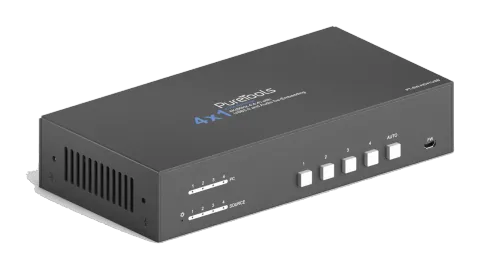
ActivePossible alternative: PT-SW-UH41-48G
PT-SW-HD41USB
4x1 4K 18Gbps HDMI Collaboration Switcher
The PT-SW-HD41USB is a 4x1 HDMI and USB switcher that consolidates four HDMI 2.0 inputs and four USB-B 3.2 (Gen1x1) connections into a single HDMI output supporting up to 18Gbps bandwidth and resolutions up to 4K@60 …
ManualControl (TCP/IP)FAQSpecificationsDatasheetAlternative availableFirmwareCE declaration ↗Available control interfaces. Expand an active type to see the full command table.
No matching commands.
RS232 Command46 commandsActive
Source: manual, chapter RS232 Command, page 18
| Command | Description | Response | |
|---|---|---|---|
| #GET_FIRMWARE_VERSION | Get the software version. | @V1.0.0 | |
| #SET_KEYPAD_LOCK 0 | Unlock the front panel buttons (Factory default). | @FRONT PANEL UNLOCK! | |
| #SET_KEYPAD_LOCK 1 | Lock the front panel buttons. | @FRONT PANEL LOCK! | |
| #GET_KEYPAD_LOCK | Get the locking status of front panel buttons. | @FRONT PANEL UNLOCK! @FRONT PANEL LOCK! | |
| #SET_AUTO_KEY_LOCK 0 | Unlock the AUTO button. | @AUTO PANEL UNLOCK! | |
| #SET_AUTO_KEY_LOCK 1 | Lock the AUTO button. | @AUTO PANEL LOCK! | |
| #GET_AUTO_KEY_LOCK | Get the locking status of AUTO button. | @AUTO PANEL UNLOCK! @AUTO PANEL LOCK! | |
| #SET_HDMI_DETECTION_MODE 0 | Set the detection method of HDMI source input to 5V. | @INPUT_SIGNAL_DETECTION 0! | |
| #SET_HDMI_DETECTION_MODE 1 | Set the detection method of HDMI source input to TMDS. | @INPUT_SIGNAL_DETECTION 1! | |
| #GET_HDMI_DETECTION_MODE | Get the detection method of HDMI source input. | @INPUT_SIGNAL_DETECTION 0! @INPUT_SIGNAL_DETECTION 1! | |
| #GET_STATUS | Get the system status. | @RS232 QUERY STATUS! @WUH4-HUB @V1.0.0 @FRONT PANEL UNLOCK! @HDMI OUT SWITCH TO AUTO MODE! @HDMI IN SWITCH TO 1! @OUTPUT_HDCP 0! @INPUT_SIGNAL_DETECTION 0! @IIS OUT ON! @SWITCHMODE 0! @USB SWITCH MODE TO 0! @USB SWITCH TO 1! @AUTO PANEL UNLOCKED! @RS232 BAUDRATE IS 1! | |
| #FACTORY_RESET | Restore factory default | @FACTORY DEFAULT! @WUH4-HUB @V1.0.0 @HDMI OUT SWITCH TO AUTO MODE! @OUTPUT_HDCP 0! @IIS OUT ON! @INPUT_SIGNAL_DETECTION 0! @HDMI IN SWITCH TO 1! @USB SWITCH MODE TO 0! @RS232 BAUDRATE IS 1! | |
| #REBOOT | Reboot the device. | @REBOOT | |
| #HELP | Get all commands and its usage. | … | |
| #SET_AV H1 | Switch to HDMI source 1. | @HDMI IN SWITCH TO 1! | |
| #SET_AV H2 | Switch to HDMI source 2. | @HDMI IN SWITCH TO 2! | |
| #SET_AV H3 | Switch to HDMI source 3. | @HDMI IN SWITCH TO 3! | |
| #SET_AV H4 | Switch to HDMI source 4. | @HDMI IN SWITCH TO 4! | |
| #GET_AV | Get the current HDMI source. | @HDMI IN SWITCH TO 1! | |
| #SET_AUTO_SWITCH 1 | Enable auto switching (Factory default). | @HDMI OUT SWITCH TO AUTO MODE! | |
| #SET_AUTO_SWITCH 0 | Disable auto switching | @HDMI OUT SWITCH TO MANUAL MODE! | |
| #GET_AUTO_SWITCH | Get the auto switching status. | @HDMI OUT SWITCH TO AUTO MODE! @HDMI OUT SWITCH TO MANUAL MODE! | |
| #SWITCH_MODE 1 | Switching mode 1. Quick switching. | @SWITCHMODE 1! | |
| #SWITCH_MODE 0 | Switching mode 2. Normal switching. | @SWITCHMODE 0! | |
| #GET_SWITCH_MODE | Get the switching mode. | @SWITCHMODE 0! | |
| #SET_SWITCH_USB [PARAM] | Switch USB to [PARAM]. [PARAM] = 1~4. 1 - PC1 2 - PC2 3 - PC3 4 - PC4 | #SET_SWITCH_USB 1 @SET SWITCH MODE 1! @SET USB SWITCH TO 1! | |
| #GET_SWITCH_USB | Get the PC which switching USB to. | @USB SWITCH TO 1! | |
| #SET_USB_SWITCH_MODE 0 | Set USB switching mode to follows the video switching. | #SET_USB_SWITCH_MODE 0 | |
| #SET_USB_SWITCH_MODE 1 | Set USB switching mode to command control by “#SET_SWITCH_USB”. | @SET USB SWITCH MODE 1! | |
| #GET_USB_SWITCH_MODE | Get USB switching mode. | @USB SWITCH MODE TO 0! | |
| #SET_IIS 1 | Turn on stereo audio output. | @IIS OUT ON! | |
| #SET_IIS 0 | Turn off stereo audio output. | @IIS OUT OFF! | |
| #GET_IIS | Get the stereo audio output status. | @IIS OUT ON! @IIS OUT OFF! | |
| #SET_EDID_MODE [PARAM] | [PARAM]= 0000~0011 [PARAM]=0000, set the EDID mode to Pass-through (Factory default). If the source device can’t read EDID from display device, it will use the built-in EDID: 3840x2160@60Hz Deep Color Stereo Audio. [PARAM]=0001/0010/0011, set the EDID of source device to user-defined EDID 0001/0010/0011. | #SET_EDID_MODE 0000 @EDID_MODE 0000! | |
| #GET_EDID_MODE | Get the EDID mode. | @EDID_MODE 0000! | |
| #EDIDR [PARAM] | Get the EDID value. [PARAM]= 0000~0011. | @EDID HEX STRING OF '0000': 00 FF FF FF FF FF FF 00 41 0C F2 08 50 12 00 00 … … | |
| #UPLOAD_USER_EDID [PARAM] | [PARAM]=0001/0010/0011, upload user-defined EDID. When the command applied, system prompts to upload the EDID file (.bin). Operation will be cancelled in 10 seconds. | #UPLOAD_USER_EDID 0001 @PLEASE SEND THE EDID FILE! … … @RECEIVED THE FILE, LENGTH=256! @EDID0001 UPDATE SUCCESSFULLY! | |
| #SET_RS232_BAUD 1 | Set RS232 baud rate to 9600. | @RS232 BAUDRATE IS 1! | |
| #SET_RS232_BAUD 2 | Set RS232 baud rate to 19200 | @RS232 BAUDRATE IS 2! | |
| #SET_RS232_BAUD 3 | Set RS232 baud rate to 38400 | @RS232 BAUDRATE IS 3! | |
| #SET_RS232_BAUD 4 | Set RS232 baud rate to 57600 | @RS232 BAUDRATE IS 4! | |
| #SET_RS232_BAUD 5 | Set RS232 baud rate to 115200 | @RS232 BAUDRATE IS 5! | |
| #GET_RS232_BAUD | Get the RS232 baud rate. | @RS232 BAUDRATE IS 1! | |
| #SET_THE_DISPLAY_TO 0 | Set the display to output black screen. | @THE DISPLAY SIDE SCREEN IS BLACK! @THE DISPLAY IS ALREADY OFF! | |
| #SET_THE_DISPLAY_TO 1 | Wake up the display screen. | @WAKE UP THE SCREEN! @THE DISPLAY IS ALREADY ON! | |
| #GET_THE_DISPLAY | Get the status of display device. | @THE DISPLAY IS OFF! @THE DISPLAY IS ON! |