
FEATURES
SCOPE OF DELIVERY
- 1x 100W GaN Multiport Power Supply (PSU)
- 1x User Manual
- This USB-C charger can be used to power common digital devices on the market with USB-C and USB-A ports
- Ideal for USB-C and USB-A devices such as docking stations, notebooks, smartphones, tablets, and more.
- Power Delivery with up to 100W and automatic charging current detection
- Multiport connections with 1x USB-C socket, 1x USB-A socket, and 1x permanently integrated USB-C cable
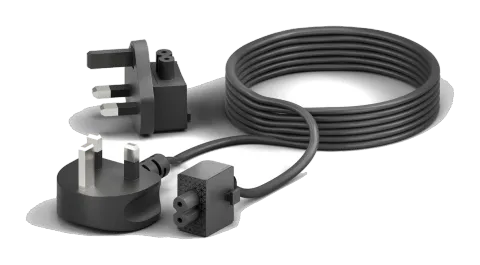
- Can be optionally connected with a power cable or directly as a power plug and easily swapped with different country adapters (e.g. England/UK)
- Compact and efficient design
- Protection against short circuit, overload, overvoltage, undervoltage, and overheating
- Made from safe and reliable components
SPECIFICATIONS
| Input/Output | |
|---|---|
| Input voltage | 100-240V, 2A max. |
| Input AC frequency | 50/60Hz |
| Output power | 100W max. (20.0V/5.0A) |
| USB-C1 output (integrated USB-C cable) | 100W max. (5V/3A; 9V/3A; 12V/3A; 15V/3A; 20V/5A), Power Delivery 3.0 |
| USB-C2 output (USB-C port) | 100W max. (5V/3A; 9V/3A; 12V/3A; 15V/3A; 20V/5A), Power Delivery 3.0 |
| USB-A1 output (USB-A port) | 15W max. (5V/3A; 9V/1.5A; 12V/1.25A), QC 3.0 |
| General | |
| Operating temperature | 0°C to 40°C |
| Storage temperature | -20°C to 70°C |
| Humidity | 5% to 95% |
| Dimensions (W x H x L) | 77mm x 56mm x 30 mm |
| Weight | 317g |
Schematic visualization of output power combinations:
- C1/C2 only: PD100W max.
- C1+C2: 60W+45W
- C2+A1: 65W+15W
- C1+C2+A1: 60W+30W+10W
- C1+A1: 90W+15W
Protection: against short circuit, overload, overvoltage, undervoltage, and overheating.
DESCRIPTION AND FUNCTION
Product Description
This product is a GaN charger and power supply unit (PSU) for powering and charging USB-C and USB-A devices such as docking stations, notebooks, smartphones, tablets, and so forth. This charger converts mains voltage into model-specific low voltage.
Preparation
- Compare the power, mains voltage, and frequency of the device to be connected and the power supply before connecting. The power supply automatically detects the required current and voltage to operate the device.
- Do not overload the device and observe the information on the rating label.
- If you want to replace the power cable or adapter plug with another country version, you must do this before connecting it to the mains and devices. Optional country adapters must be purchased directly from the manufacturer (PureLink GmbH). We assume no responsibility for the use of third-party accessories with this power supply.
Connection and Operation
- Connect your device to the power supply.
- Plug the charger into a 100-240V ~50/60Hz mains socket.
WARRANTY AND LIABILITY
If you detect an error or damage to your product, please contact your dealer and provide proof of purchase such as a receipt or invoice if necessary. Your dealer will either fix the error on site or send the device to PureLink. Please describe the possible errors in the description - only then can you be sure that the rarely occurring errors are reliably found and fixed! Any use other than that described in this user manual is not permitted.
DISCLAIMER
PureLink GmbH assumes no liability or warranty for damages resulting from improper installation, assembly, and use of the product or failure to observe the user manual and/or safety instructions.
TRADEMARKS
Product model and logo are legally protected. All other trademarks and trade names mentioned in this manual are the property of their respective trademark owners. The manual may only be copied or reproduced in whole or in part with prior written permission from the respective owner.
Legal & Compliance
Product identification
Model: VL-PSU110-UK – manual version 1.0
Warranty and liability
The manufacturer grants the full statutory warranty on all new devices. As the manufacturer has no influence on installation, the warranty only applies to the product itself. If you detect a fault or damage, please contact your dealer and provide your sales slip or invoice as proof of purchase.
The manufacturer is not liable for damage to persons or property caused by improper installation, operation or maintenance not described in this manual. Do not alter or modify the product or its accessories. Any use other than described in this manual is not permitted and voids warranty and guarantee.
Trademarks and disclaimer
Product model and logo are trademarks. All other company and product names mentioned are trademarks of their respective owners. All rights reserved. No part of this publication may be copied or reproduced without prior written permission. We reserve the right to make changes to the device, packaging or manual and accept no liability for misprints.
Disposal of electrical and electronic equipment
WEEE reg. no.: DE 93847290
The crossed-out wheelie bin symbol on the product, packaging or in this manual means that electrical and electronic equipment must not be disposed of with household waste at the end of its life. Hand in old devices free of charge at a public collection point or return them to a distributor obliged to take them back. Remove batteries and lamps that can be removed without destroying the device before handing it in, and delete any personal data stored on the device. Details are regulated by national law. By returning old devices you help protect the environment.
Packaging
Dispose of packaging separately by material (paper/cardboard, plastics) via the local collection systems. Keep packaging material away from children – risk of suffocation. Packaging register LUCID: DE5958616449295.