
General Notes
Please read this user manual in its entirety and carefully. It forms part of the product and contains important notes for operating and storing. Please keep this document in a safe place for other users or for personal reference.
This product is intended for indoor use only. Please do not use it in any outdoor areas. Any contact with water and moisture must be avoided under all circumstances.
For product safety and compliance purposes (CE), please do not rebuild and/or modify this product. Please note that if you use the product for purposes other than those described above, the product may be damaged. In addition, improper use can cause hazards such as short circuiting, fire, electric shock, etc.
Safety Instructions
Read the Manual
Before using the power supply unit (PSU), read the operating instructions supplied with the product carefully and follow all the safety instructions described below.
Voltage Compatibility
Ensure that the input voltage of the PSU matches the voltage available at your location. This PSU is designed for use with 100-240V AC power supply.
Mains Cable Usage
Only use the mains cable supplied with the power supply unit. Do not attempt to modify or replace it. Before use, check that the plug on the mains cable is compatible with the sockets in your country.
Ventilation & Heat Dissipation
Ensure that the PSU has adequate space around it for ventilation and heat dissipation. Do not stack objects on top of the PSU or place it in enclosed spaces without proper ventilation.
Moisture and Water
Keep the PSU away from moisture and water sources to prevent electric shock and damage to the unit. Do not operate the PSU in damp or wet conditions.
Overload
Do not exceed the maximum rated power of the power supply unit. Ensure that the total power consumption of the connected devices does not exceed the maximum specification of the power supply unit (see rating label on the product).
Cable Management
Avoid placing the PSU and its cables in areas where they can be tripped over or damaged. Route cables away from sharp edges or heat sources.
Children and Pets
Keep the PSU and its cables out of reach of children and pets to prevent accidental injury or damage.
Unattended Operation
Do not leave the PSU unattended while it is powered on. Turn off the PSU and unplug it from the power outlet when not in use.
Maintenance
Regularly inspect the PSU and its cables for any signs of damage or wear. Do not use the PSU if it appears damaged or if the cables are frayed or exposed.
Authorized Service
Only authorized personnel should perform repairs or modifications to the PSU. Contact customer support for assistance or servicing.
Emergency Disconnect
In case of any malfunction or abnormal operation, immediately disconnect the PSU from the power outlet and discontinue use. Contact customer support for assistance.
Storage
When not in use, store the PSU in a cool, dry place away from direct sunlight and extreme temperatures.
Delivery Contents
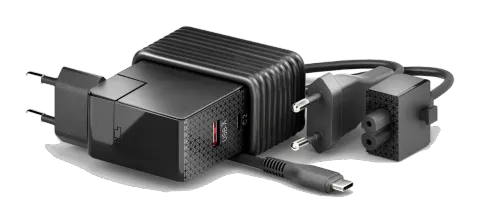
- 1x 100W GaN Multiport Power Supply Unit (PSU)
- 1x User Guide
Features
- This USB-C charger can be used to power common digital devices on the market with a USB-C and USB-A connection
- Ideal for USB-C and USB-A devices such as docking stations, notebooks, smartphones, tablets and much more
- Power delivery with up to 100 watts and automatic charging current detection
- Multiport connections with 1x USB-C socket, 1x USB-A socket and 1x permanently integrated USB-C cable
- Can be connected either with a mains cable or directly as a wall plug and can be easily exchanged with various country adapters (e.g. England/UK)
- Compact and efficient design
- Protection against short circuit, overload, overvoltage, undervoltage and overheating
- Made from safe and reliable components
ODBHƥB@SHNMR
Input/Output Data
| Specification | Value |
|---|---|
| Input voltage | 100-240V, 2A max. |
| Input AC frequency | 50/60Hz |
| Output | 100W max. (20.0V/5.0A) |
| USB-C1 output (integrated USB-C cable) | 100 W max. (5V/3A; 9V/3A; 12V/3A; 15V/3A; 20V/5A), PD 3.0 |
| USB-C2 output (USB-C socket) | 100 W max. (5V/3A; 9V/3A; 12V/3A; 15V/3A; 20V/5A), PD 3.0 |
| USB-A1 output (USB-A socket) | 15 W max. (5V/3A; 9V/1.5A; 12V/1.25A), QC 3.0 |
General
| Operating Temperature | 0°C to 40°C |
|---|---|
| Storage Temperature | -20°C to 70°C |
| Humidity | 5% to 95% |
| Product size (w x h x l) | 77mm x 56mm x 30 mm |
| Product Weight | 317g |
Schematic visualization of output power combinations:
Protection against short circuit, overload, overvoltage, undervoltage and overheating.
| Configuration | Output |
|---|---|
| C1/C2 only | PD100W max. |
| C1+C2 | 60W+45W |
| C2+A1 | 65W+15W |
| C1+C2+A1 | 60W+30W+10W |
| C1+A1 | 90W+15W |
Description and Function
Product Description
This product is a GaN charger and power supply unit for powering and charging USB-C and USB-A devices such as Docking Stations, Notebooks, Smartphones, Tablets etc. This charger transforms mains voltage into model-specific low voltage.
Preparation
- Before connecting, compare the power, mains voltage and frequency of the device to be connected and the power supply unit. The power supply unit automatically recognizes the power and voltage required to operate the device.
- Do not overload the device and observe the information on the rating plate.
- If you want to replace the mains cable or the adapter plug with a different country version, you must do so before connecting it to the mains and the devices. The optional country adapters must be purchased directly from the manufacturer (Purelink GmbH). We accept no responsibility for the use of third-party accessories with this power supply unit.
Connecting and Operating
- Connect your device to the power supply unit
- Plug the charger into a 100-240V ~50/60Hz mains socket
CE Conformity
PureLink GmbH hereby declares that this product is in compliance with the essential requirements and other relevant provisions of the ErP directive (2018/1782), RoHS directive (2011/65/EC; amended by 2015/863/EU), EMC Directive (2014/30/EU) and Low Voltage Directive (2014/35/EU).
PureLink GmbH hereby declares that this product is in compliance with the essential requirements of the Electromagnetic Compatibility Regulations 2016 and all other applicable UK regulations.
The EU Declaration of Conformity is available here: www.purelink.de
Disposal of device
WEEE-Reg.-Nr. DE 93847290
According to the European WEEE Directive, electrical and electronic equipment may not be disposed of with household waste. As a consumer, you are obliged to return electrical and electronic equipment free of charge at the end of its service life to the public collection points set up for this purpose or to the point of sale. Details on this are regulated by the respective national law.
The symbol on the product, the instructions for use or the packaging refers to these regulations. Recycling old appliances in this way is an important contribution to the protection of our environment.
Warranty and Liability
If any fault or damage is detected on your product, please contact your dealer and provide your sales slip or invoice as evidence of the purchase, if necessary. Your dealer will repair the fault either on site, or send the device PureLink. Please describe the possible faults in detail – only then you can be assured that faults, occurring only rarely, will be found and repaired with certainty! Any use other than described in this user`s manual is not permitted.
Disclaimer of liability
PureLink GmbH will not be held liable, nor provide any warranty for damage resulting from improper installation, assembly and use of the product, or failure to observe the operating instructions and/or safety instructions.
Trademark
Product model and logo are trademarks. All other trademarks mentioned in this manual are acknowledged as the property of the trademark owners. No part of this publication may be copied or reproduced without prior written permission of their respective owners.
Legal & Compliance
Product identification
Model: VL-PSU110 – manual version 1.0
Packaging
Dispose of packaging separately by material (paper/cardboard, plastics) via the local collection systems. Keep packaging material away from children – risk of suffocation. Packaging register LUCID: DE5958616449295.